Table of Contents
CyberGrants Disbursement Services (CGDS) clients use Funding Invoices (formally known as Funding Requests) as the supporting documentation they require before transferring funds for employee donations, company matches, and grant payments. All new invoices moved online in May 2021 and are available to authorized administrators via the Funding Invoice Console located on the CyberGrants Admin tab. Invoices delivered before this date are not available online at this time.
CGDS Funding Invoice Configuration
Accessing Configuration
Funding Invoices can be configured by authorized administrators by clicking the Funding Invoice Configuration hyperlink on the CyberGrants Admin tab.
Additional users can be granted access to the console with the Ability to Configure Funding Invoices & Credit Memos setting that can be added to a User Role.
Learn more about user roles and privileges
Funding Invoice Types Listing Screen
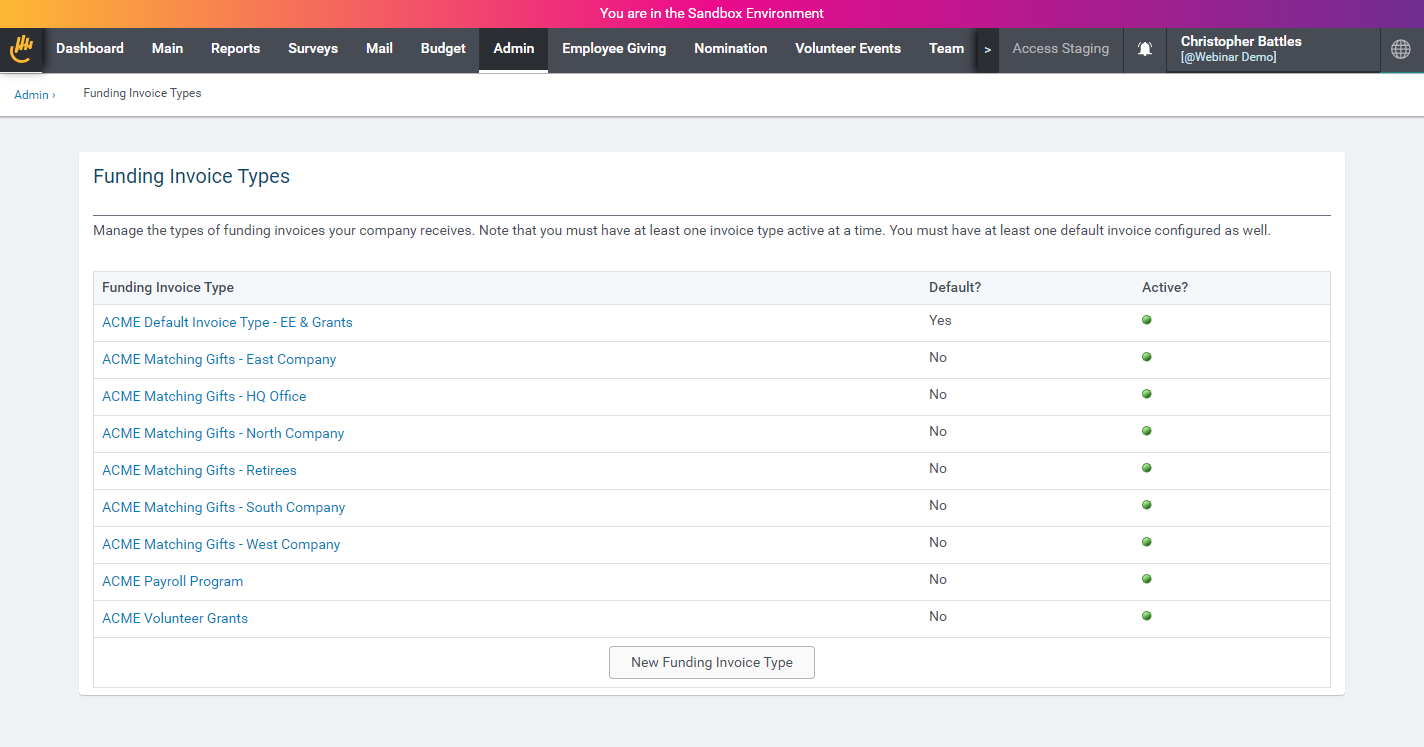
The Funding Invoice Types listing screen shows a complete history of your Invoice Types. It also identifies your default Invoice Type and whether it’s currently active. Click on the “New Invoice” link to start a new invoice. Click on an invoice name to access the configuration for an existing invoice.
Configuration Basics
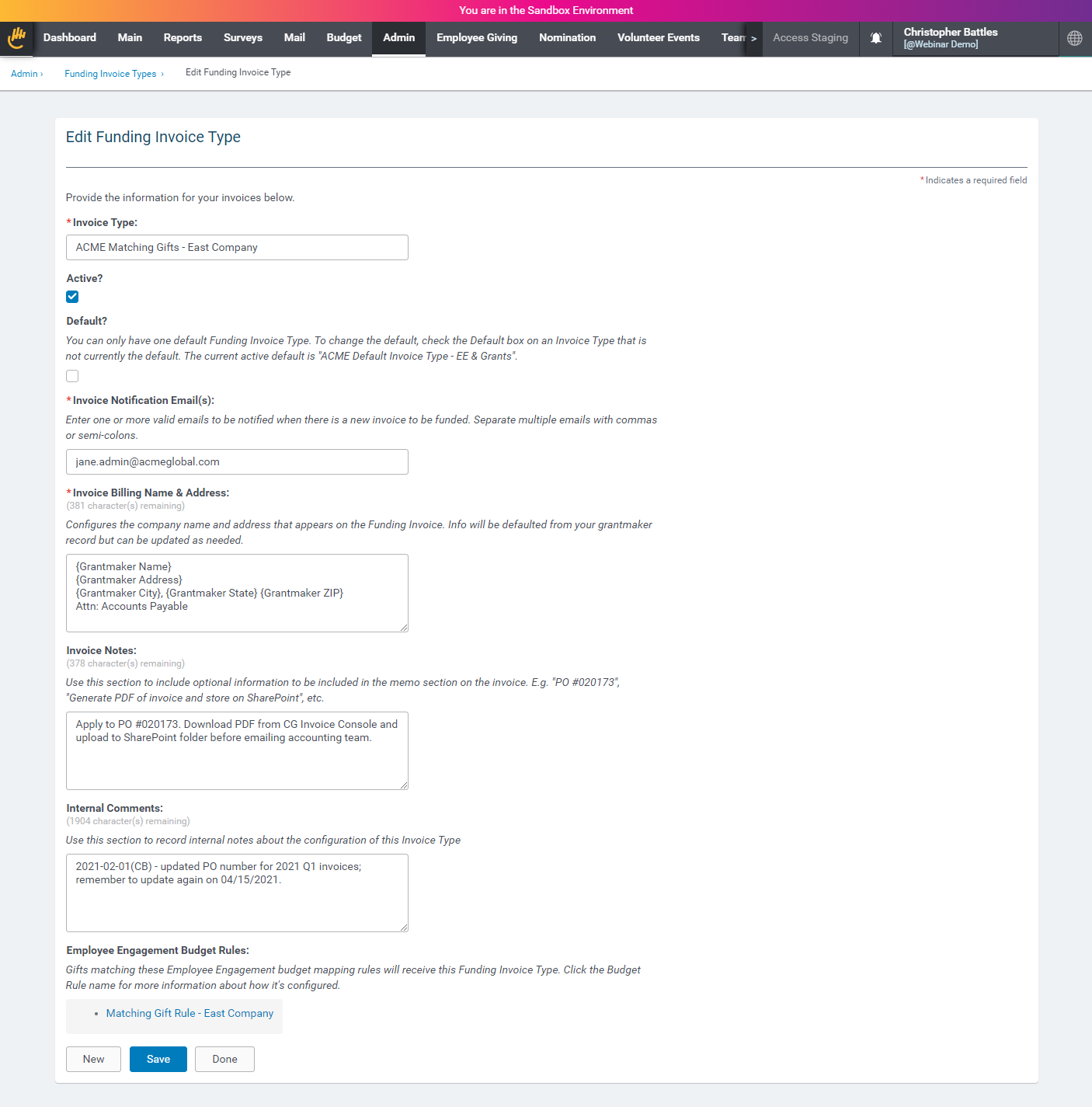
Funding Invoices may be configured to control how they appear, who is contacted regarding their status, and the conditions where they apply. The following is a table describing each of the settings.
|
Field Name
|
Description
|
|
Invoice Type
|
The Invoice Type is the “name” for your invoices. Choose your Invoice Type names carefully since they will appear on the invoice document, email notifications, and Funding Invoice Console.
|
|
Active
|
Active Invoice Types are eligible to receive new payments. Unchecking the Active checkbox prevents new invoices from mapping to an Invoice Type. You must have at least one Invoice Type active so we have something to map new invoices to.
|
|
Default
|
You must have exactly one Invoice Type set as the Default so we know where to map grants and employee giving payments that don’t map to other custom Invoice Types.
|
|
Invoice Notification Email(s)
|
Enter one or more emails to be notified when there are new invoices to be funded. Separate them with commas or semicolons.
|
|
Invoice Billing Name & Address
|
The billing name and address appear on the invoice. We merge information from your Grantmaker record to start. Overwrite the default info as necessary.
|
|
Invoice Notes
|
Invoice Notes appear on the invoice. They can be used to convey additional notes or reminders for your accounting team.
|
|
Internal Comments
|
Internal Comments appear only on the Invoice Type configuration screen. They’re used to record administrative comments regarding how the invoice is configured.
|
|
Employee Engagement Budget Rules
|
This section offers links to the Employee Engagement Budget Rules mapping to this Invoice Type.
|
Employee Giving Funding Invoice Types
The new custom Invoice Type capability allows authorized administrators to teach CyberGrants how to automatically split their employee-giving invoices into separate documents. Once the gifts and payments are on separate invoices, they can be sent to different contacts and funded on their own schedule. For information on assigning custom invoice types to cash grant programs, see Grant Program Funding Invoice Types below.
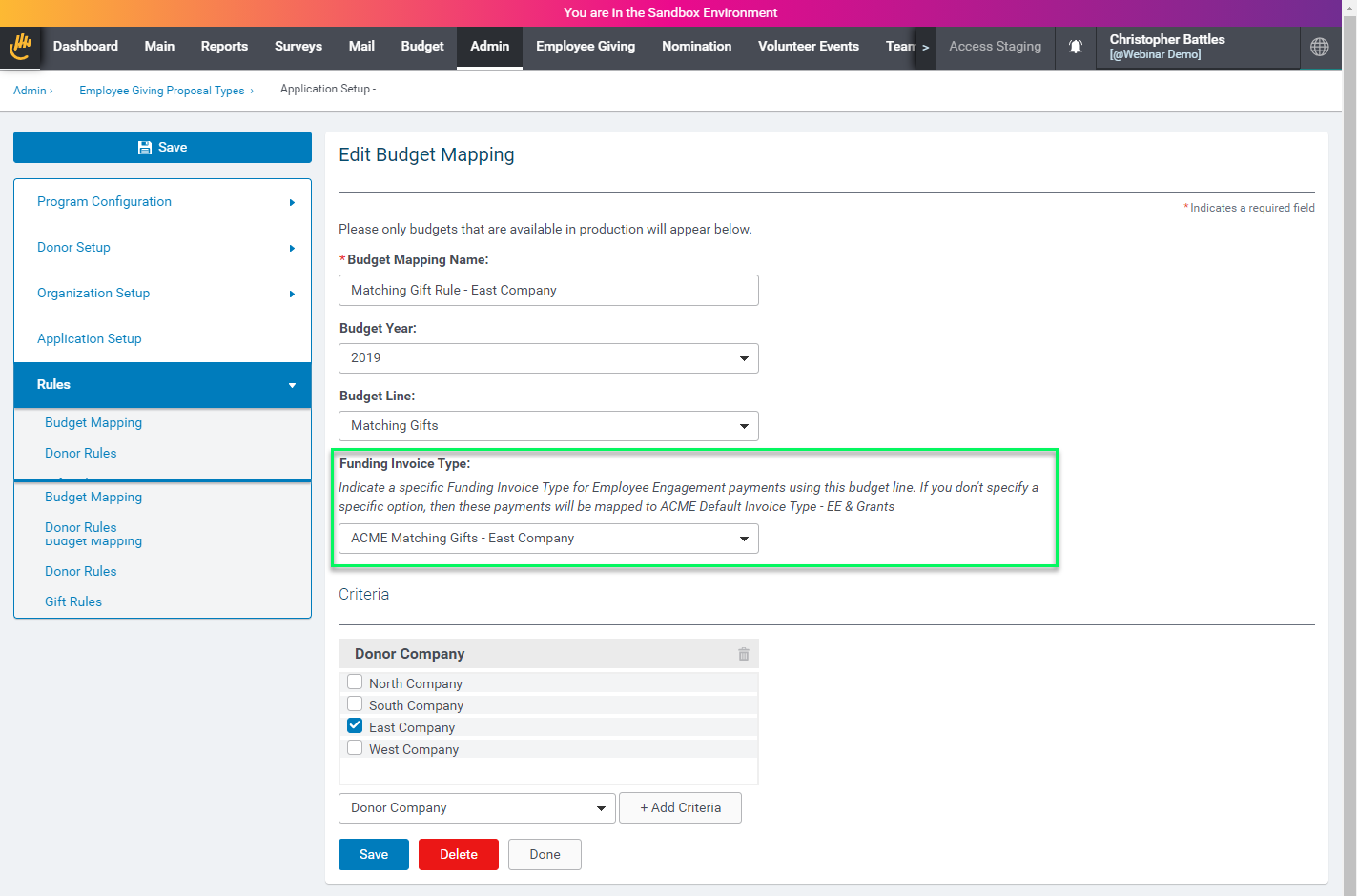
Custom Invoice Types are configured by pairing them up with Employee Giving Budget Rules. Whenever you configure a new Budget Rule, you create a mapping by selecting combinations of organization, donor, program, and gift criteria. Now, in addition to indicating which budget the payments should be mapped to, you can also pick from one of your pre-configured Invoice Types. Any time a gift maps to that rule, it will also map to that Invoice Type. Note that linking a Budget Rule to an Invoice is completely optional. If you don’t connect a Budget Rule to an Invoice Type, it will automatically go to the default.
Grant Program Funding Invoice Types
CGDS clients whose cash grant programs are funded by legally separate entities — such as a corporate entity and a foundation — can now contact Payment Ops to have their system configured so that each grant program can be assigned to a designated Funding Invoice Type. Programs configured for separate Funding Invoice Types are never combined on the same invoice, so each legal entity’s disbursements appear on a distinct invoice that maps cleanly to that entity.
Configuration is applied at the proposal type level. Bonterra staff assign the Funding Invoice Type in the CGDS Configuration section of each grant proposal type. The field is read-only for client administrators.
- To request configuration, contact Payment Ops or Support.
Grants proposal types not assigned to a designated Funding Invoice Type will continue to be invoiced together on the default invoice.
Note: This capability applies to CGDS-enabled cash grant programs only. Employee Engagement program invoicing continues to be configured via Budget Rules as described above.
Splitting Invoices by CGDS Disbursement Account Budget Mapping Criteria
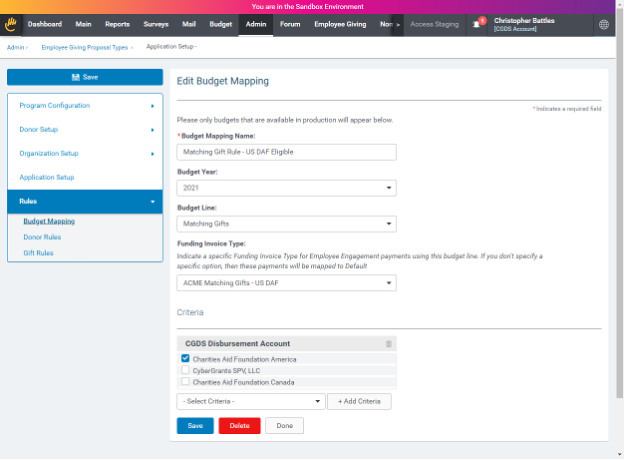
Separate invoices can be generated based on the CGDS account that will be used to make the payment. With this capability, you can configure CyberGrants to send invoices that will be disbursed from a Donor Advised Fund (DAF) hosted by Charities Aid Foundation (CAF) to one department, and any remaining funds going through the CyberGrants Special Payments Vehicle (SPV) to another department.
To split the invoice, create separate budget mapping rules using the CGDS Disbursement Account criteria for the CAF invoice and another for the SPV.
Back to Funding and Invoicing
Back to Homepage


