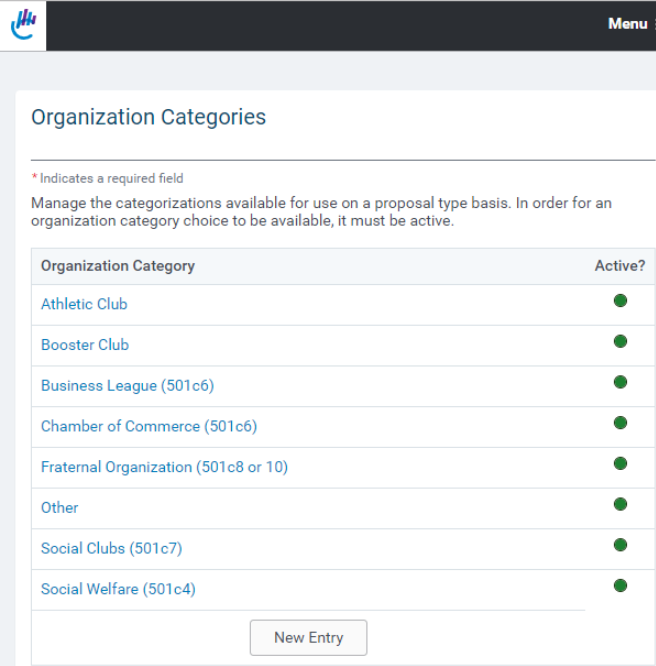
The “Organization Category” link, located within the “Organization Management” subsection, opens a screen that enables an Administrator to create a list of organization categories. The screen contains:
- “Immediate Parent Listing”
NOTE: Initially the “Immediate Parent Listing” only contains the value “**Organization Category**”. When categories are entered, the select box contains those category names. - “Organization Category”
- “Active?”
To create a “parent” organization category:
- Highlight “**Organization Category**”
- Enter the category name in the textbox.
- Check the “Active?” button.
- Click the “Save” button
- Click “Done” to see changes in the “Organization Category” display at the top of the page.
To create a hierarchy within an organization category:
- Highlight a previously entered organization category to be the “parent”.
- Enter the sub-category name in the textbox.
- Check the “Active” button.Click the “Save” button
- Click “Done” to see changes in the “Organization Category” display at the top of the page.
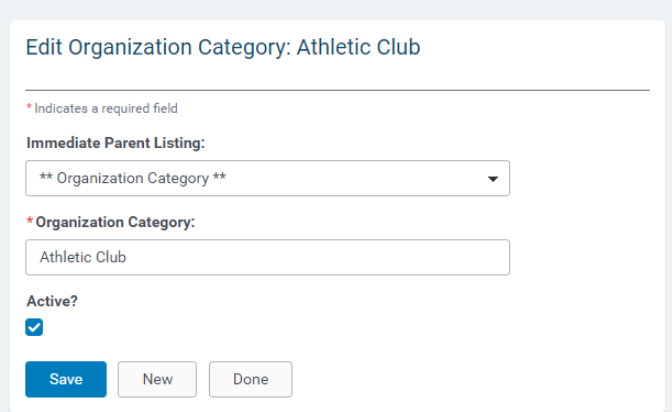
NOTE: To prevent a user from selecting an organization category value, select the link in the
“Organization Category Box” at the top of the screen and uncheck the “Active” box in the Edit
Organization Category section that appears at the bottom of the screen.


