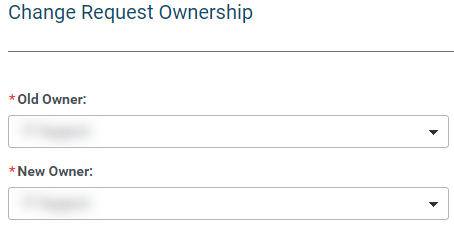
This functionality allows an Administrator to transfer ownership of requests from one user to another. Two identical lists of users are listed under the headings “Old Owner” and “New Owner”. Only current, active users with Administrator, Budget, or Basic level access are listed. (The list excludes any user who has “CyberGrants” included in the e-mail address to prevent assignment to a Client Manager.)
Step 1: Access the Admin tab
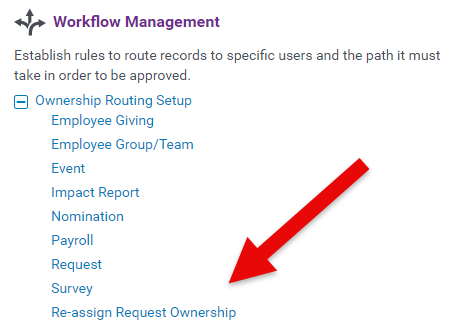
Enter the Admin tab, scroll down to Workflow Management, and select "Re-assign Request Ownership."
Step 2: Change Ownership
Select the name of the “Old Owner” and the name of the “New Owner”.
Step 3: Save Changes
After completing the change, click the "Save" button.

What else do you need help with?


