Watchlist Overview
Watchlist Descriptions
CyberGrants maintains licenses with Bridger Insight, a vendor of Windows based and web-based WatchList scanning software. During a scan, CyberGrants runs certain information against up to 42 watch lists and flags the transactions/organizations that have a close match. You can choose which Watchlists to enable. Our standard setting is a score of at least 93% for 9 of those watchlists, which have already been included in your Implementation Workbook.
Here is a short summary on what happens during a scan:
- Information is gathered from specified text and user-defined fields from the organization and/or transaction records
- Even if you do not choose specified fields, the system will automatically scan certain standard fields like the organization’s name, the applicant’s name, etc.
- A record is posted for scanning to the Bridger Insight website
- Results are returned from Bridger Insight
- The results from Bridger Insight are displayed within the CyberGrants organization or transaction record
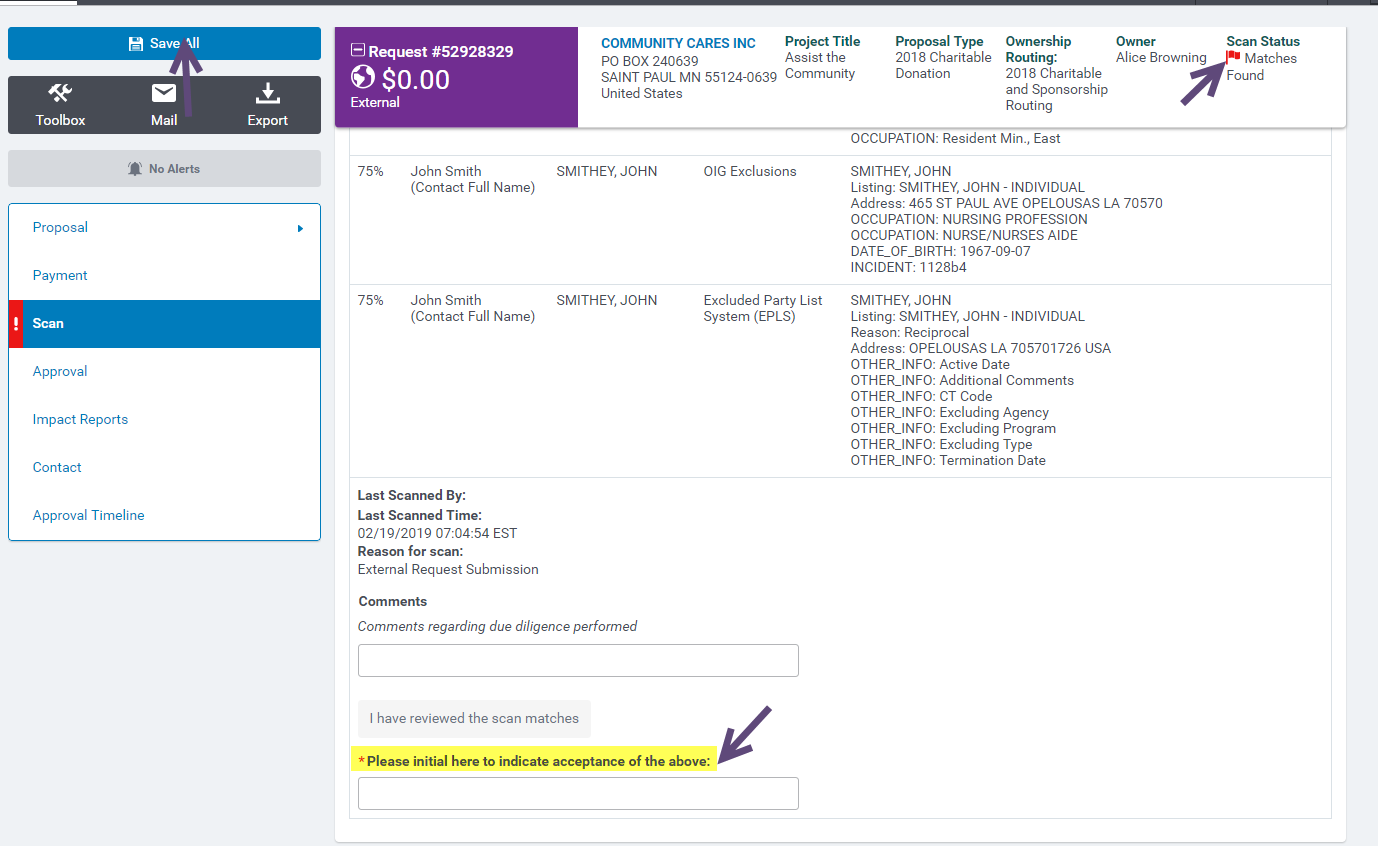
- An icon indicating if matches were found or not found is displayed in CyberGrants organization or transaction record
To clear a Watchlist Flag
To accept a match found flag and proceed with submitting the request into the workflow, you will need to intial in the “Please intitial here to indicate acceptance” field then Save the request