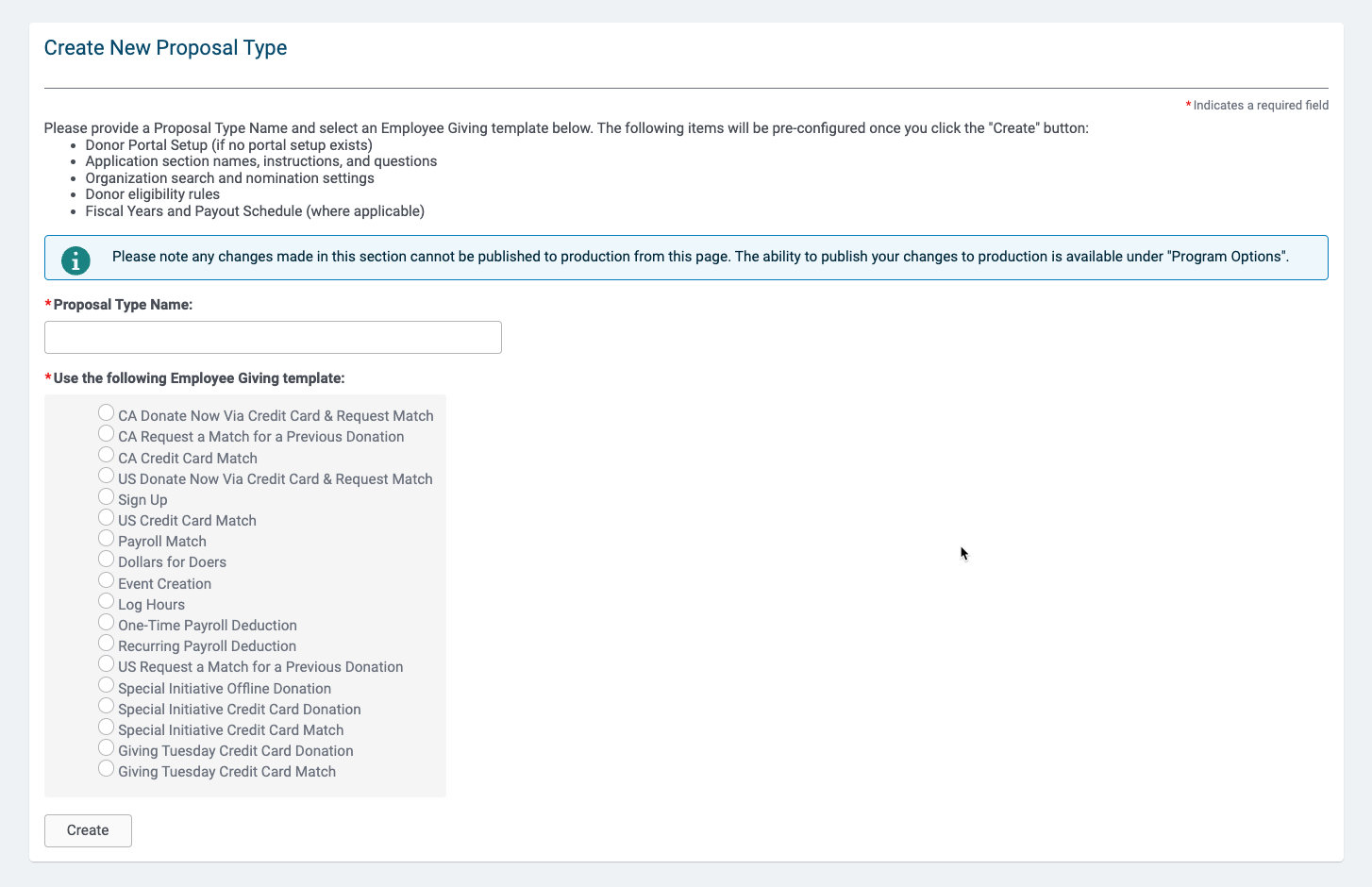
Admin > Employee Application Configuration > Proposal Types > New Proposal Type
- Choose from the list of proposal type templates to create your program
- Enter a Name
- Click Create button.
- Repeat for all programs needed.
Available Proposal Type Templates:
-
CA Donate Now Via Credit Card & Request Match: Collect Credit Card Donations to Canadian Orgs
-
CA Request a Match for a Previous Donation: Request a Company Match for funds donated outside of the donor portal in CAD
-
CA Credit Card Match: Paired with CA Donate Now Via Credit Card & Request Match. Will automatically generate company funded matches for donations meeting match criteria.
-
US Donate Now Via Credit Card & Request Match: Collect Credit Card Donations to US Orgs
-
Sign Up: Registration for Volunteer Opportunities
-
US Credit Card Match: Paired with US Donate Now Via Credit Card & Request Match. Will automatically generate company funded matches for donations meeting match criteria.
-
Payroll Match: Paired with One-Time Payroll Deduction and/or Recurring Payroll Deduction. Will generate company funded matches for Payroll Donations meeting match criteria.
-
Dollars for Doers: A volunteerism grant linked to a Log Hours proposal type
-
Event Creation: Create Volunteer Events. Must be linked to a Sign Up and Log Hours proposal type.
-
Log Hours: Log hours volunteered
-
One-Time Payroll Deduction: Payroll Deduction
-
Recurring Payroll Deduction: Payroll Deduction
-
US Request a Match for a Previous Donation: Request a Company Match for funds donated outside of the donor portal in USD
-
Special Initiative Offline Donation: Request a Company Match for funds donated outside of the donor portal. Donation must meet criteria for the Initiative (Disaster Relief or Special Campaign)
-
Special Initiative Credit Card Donation: Collect Credit Card Donations to nonprofits associated with the special initiative.
-
Special Initiative Credit Card Match: Paired with Special Initiative Credit Card Donation. Will automatically generate company funded matches for donations meeting match criteria.
Configure each proposal to include specific program details
- Admin > Employee Application Configuration > Proposal Types > View Proposal Types
- Click the link to edit a proposal
- Select the appropriate Donor Portal Page and match to the appropriate portal page. The page is where a donor will be taken when they complete their transaction and click on "Return to Home"
- Enter Program Administrator - Used for the sender's email address
- Enter Program Support User - "Generic Client Name"set to the support user and add the email address for emailing support


