What are Gift Rules?
- Gift rules verify that the information entered into the application are eligible or ineligible for submission
- Gift rules are required for a proposal type to work
- Gift rules can display information or error messages about why a submission is not allowed
- Gift rules will only prevent the submission phase but not anything leading up to it
- Gift rules drive the match component
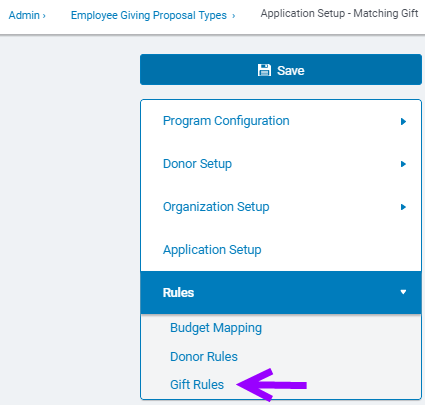
Gift Rules Setup is based on program requirements for each Grantmaker. An administrator can modify donor rules by going to Admin › Employee Giving Proposal Types › Application Setup -> Rules -> Gift Rules:
Gift Rules define the match for the specific gift (based on the gift tables).
Examples:
- 2 sets of eligible/ineligible rules: Executives have a match of 1:1 whereas employees have a match of 3:1 and gift must be made within the last 90 days. The gift must always be over $50.
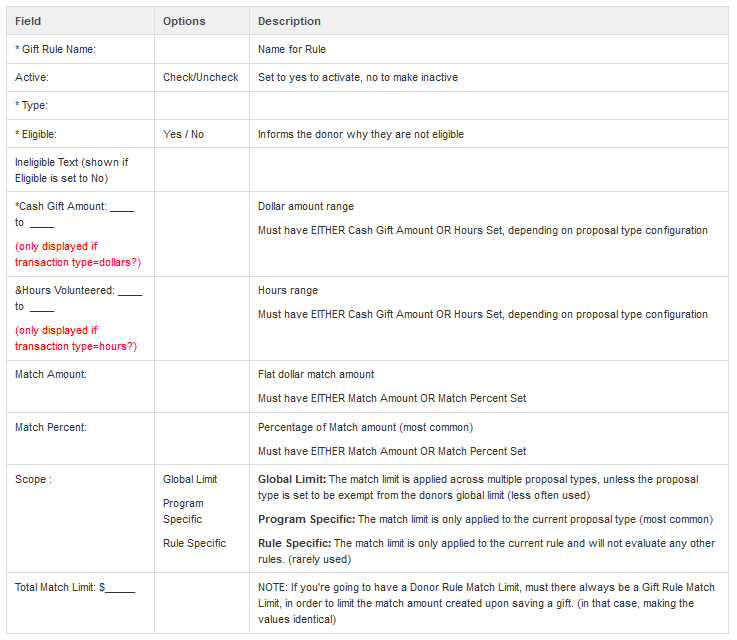
Applies to both Gift Rules & Donor Rules
- Everything is in the "base currency", therefore limits, etc must be in the base current (usually USD).
- If there is custom criteria, the criteria area will say "This criteria is not configured to display. Please contact your CyberGrants Administrator."
- You do not need an ineligible rule, if everyone and everything is eligible. If that is not the case, you must have an eligible & ineligible rule.
- Criteria are always evaluated in order from most criteria to least.
Why is there a Total Match Limit in both Gift Rule & Donor Rule?
- If you're going to have a Donor Rule Match Limit, must there always be a Gift Rule Match Limit, in order to limit the match amount created upon saving a gift. (in that case, making the values identical)
- This also allows for something more complicated like: Per application the match amount couldn't be more than $500, but the allowance for the program is $10,000.


