Overview
Payroll File - Outbound (CyberGrants to Client)
Payroll File - Inbound (Client to CyberGrants)
Error Conditions
Overview
Client employees may use CyberGrants to start, stop, or modify contributions to non-profit organizations by having a specified amount withheld from their paychecks. CyberGrants sends the details of the employees’ deduction preferences to the client’s payroll at regular intervals in a file which conforms to the specifications provided by the client’s Payroll department. After payroll processing, payroll generates a file containing details of payroll processing back to CyberGrants so that CyberGrants can maintain a record of the amount contributed to each organization.
All data contained in the file should follow these general conventions:
- Data file format – the preferred format is fixed-width ASCII, however comma and tab-delimited is acceptable as well. Each data element, represented by a particular column in the layout, must start at the same position in each row. In the event where a particular record cannot fill the full length of its column, trailing spaces should be added to ensure a consistent width and that the next field will start in its designated position. Note that any trailing spaces within a column will be automatically removed during import into CyberGrants.
- The following is defined in the record layout specification:
- Field names
- Field types
- Field lengths
- Date formats – all dates should be in “YYYYMMDD” format
- Number formats – all numbers should be in “99999999999” format. No commas can be accepted.
- The file should contain a trailer row to ensure proper archiving and that all data was imported and interpreted correctly.
Payroll File - Outbound (CyberGrants to Client)
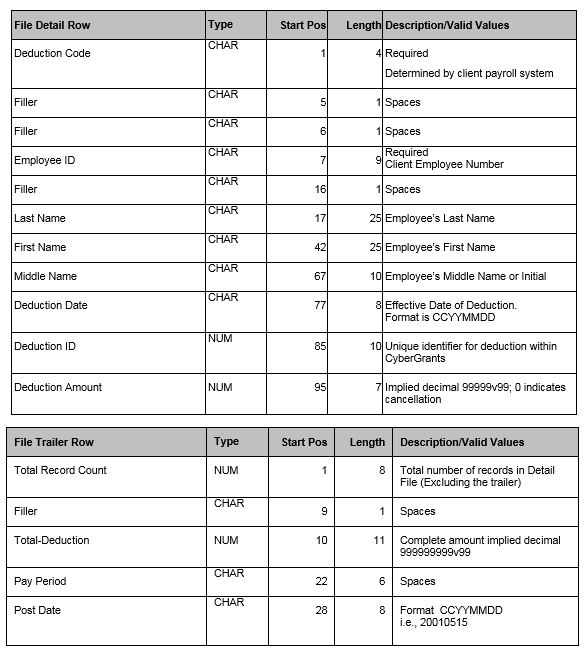
The outbound payroll file is generated on CyberGrants according to the specifications provided by the client’s payroll department. This file provides payroll with the donor specified amount or percentage to withhold from each paycheck, and typically includes donor information, amount deducted, effective date, and any other fields required by payroll to complete processing.
Payroll File - Inbound (Client to CyberGrants)
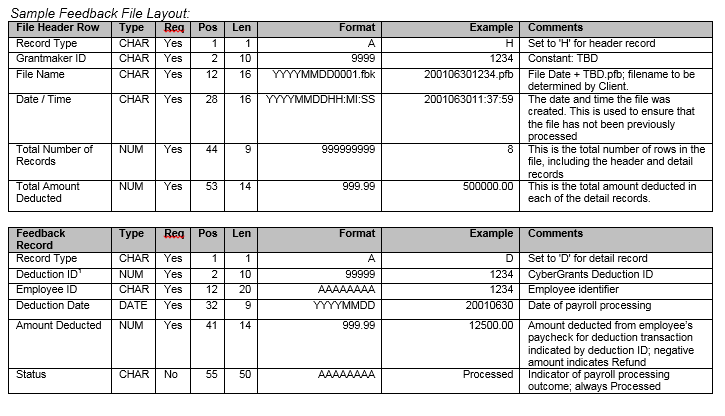
The inbound payroll, or feedback file, updates CyberGrants with the actual amount withheld from each employee’s paycheck. Payroll generates a file containing the donor information, amount deducted, and date on which payroll was processed after processing is complete.
Error Conditions
- Employee ID received in feedback file not found in CyberGrants
- Employee ID and transaction ID combination in feedback file invalid
- Discrepancy between feedback summary and detail
-
- If the number of records indicated in the feedback header record doesn’t match the number of records in the file or the deduction total in the feedback header record doesn’t match the total of the amount deducted in the file, CyberGrants will halt processing.
NOTE: CyberGrants assigns a unique identifier to each employee, recipient organization, and deduction amount/percentage in CyberGrants. CyberGrants strongly recommends that the client payroll system receive this identifier and pass it back to CyberGrants in the feedback file so that CyberGrants can maintain a definitive link between exact deduction transaction registered by the employee, and amount deducted by payroll.


