Overview
To electronically verify employment status and establish employee programs (Matching Gifts, Disaster Relief, Volunteerism, etc.) eligibility, the client’s Human Resources (HR) department periodically uploads a data file containing employee information. This information is imported into CyberGrants through an automated process. The file must include a unique identifier for each employee (e.g. employee identification number), eligible employee types (e.g. active full-time, retiree, contractors, etc), and employee information relevant for reporting and correspondence.
IMPORTANT: CyberGrants will not use Social Security Number for the unique identifier.
Human Resources Feed Setup
Before the HR feed can be implemented, CyberGrants needs to receive the following information from the client’s employee programs administrator:
Technical contact at Human Resources
- Method of file transfer
- secure FTP: Client can deliver the HR file directly to a secure site at CyberGrants. Click here to learn about the SFTP Server Configurations supported by CyberGrants.
- passive FTP: Client can place the HR file on their own server and CyberGrants will retrieve it.
- File encryption requirements
- Will file encryption be used?
- What file encryption software will be used? (PGP encryption is typically used)
- What is the encryption key?
NOTE: The frequency of the feed (e.g. biweekly, monthly, quarterly) is useful information for CyberGrants. Client has the option to upload more frequently as desired.
Data Feed File Layout
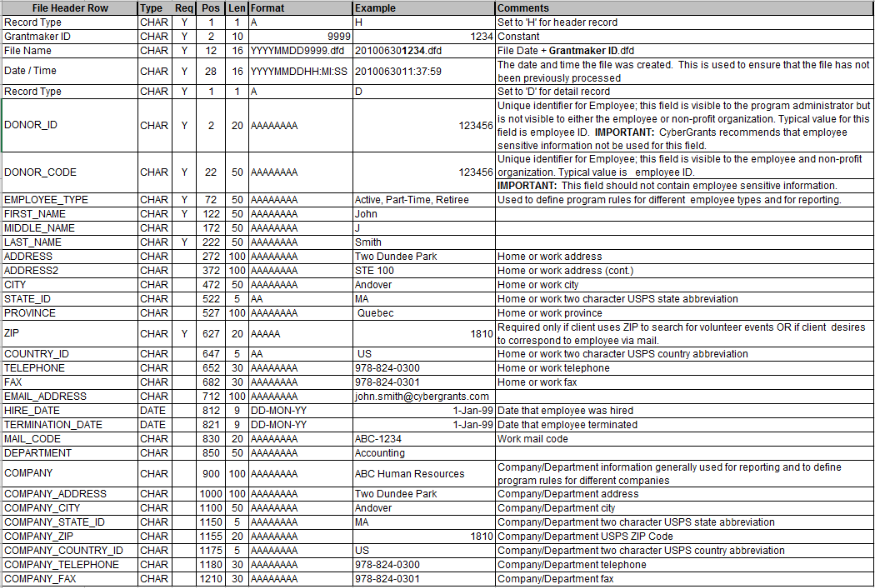
The format of the HR file is either fixed length or comma delimited, ASCII flat file. Most fields in the “Standard Donor Feed File Layout” are not required for use in the CyberGrants employee program modules. To determine which values to include in the file, the employee program administrator needs to consider:
- What information is needed for reporting/administration. For example, employee address fields are needed if the program administrator plans to periodically mail program participants. NOTE: ZIP is used for Volunteer Programs. (See ZIP in the file layout for further explanation.)
- What information CyberGrants needs to enforce appropriate program rules. For example, the employee type field is frequently used to establish eligibility rules and match limits for each program based on the employee type.
Two key fields are Donor ID and Donor Code. Both must be unique within the data file; the values for Donor ID and Donor Code can be identical for an individual employee. The primary difference between the two fields is visibility:
- Donor ID is only visible to the program administrator;
- Donor Code is visible to the employee, the recipient non-profit organization, and the program administrator.
Therefore, the donor code field is a non-sensitive identifier such as an employee ID number. If the Donor ID and Donor Code for an individual differ, the employee uses the Donor Code to log in to the website to register gifts and view giving history.
NOTE: Place a blank (null) value in the appropriate positions for any field that does not contain a value.
NOTE: The Trailer row is optional. It can be used as an audit to ensure that the number of rows uploaded corresponds to the number of rows loaded into Cybergrants. Inform your Account whether you will or will not use the trailer record.

Looking for training?
Explore this feature at your own pace - access training video content or watch a recorded webinar by clicking the link below.


