CyberGrants offers an automated Accounts Payable (AP) solution for grantmakers to facilitate issuing gift checks to non-profit organizations. A file (typically ASCII or XML) can be automatically generated by CyberGrants according to a pre-determined schedule and then securely transmitted to a client’s Accounts Payable group. The method often includes a feed from AP back into CyberGrants with the processing results, thereby providing a closed-loop process for the grants administrator
AP Feed Setup
Before the AP feed can be implemented, the following information is needed by CyberGrants:
- Contact Accounts Payable for AP Feed implementation
- Frequency of the feed (e.g. biweekly, monthly, quarterly)
- Approximate number of payments per file
- How will the file be transferred (e.g. passive FTP --- HR can place the file on their own server where CyberGrants will retrieve it or they can deliver the file directly to CyberGrants.com)
- File encryption requirements (if necessary, is file encryption required? If so, how should the file be encrypted?)
- Implementation of reverse feed (from AP into CyberGrants) (Recommended)
- Handling of new payees (Does AP support creating new vendors dynamically, or do vendors have to be created in the AP system prior to the AP feed being sent?)
AP File
The AP feed file is generated on CyberGrants according to the specifications provided by the client’s Accounts Payable department. It typically includes payment fields stored in CyberGrants (e.g. payment amount, payment type, payee information) as well as account numbers and other constants supplied by the client’s AP department.
Payee/Vendor information is typically included in the AP feed file accordingly to the business rules supplied by a client’s AP group. AP may or may not support the receipt of new payees via the feed, in which case the CyberGrants Client Manager will discuss options for addressing this business model. Typically a process exists outside of CyberGrants for internal CyberGrants users to have new vendors created in their AP system and assigned a vendor code. The vendor code is then entered into CyberGrants prior to AP file generation.
AP Feedback File
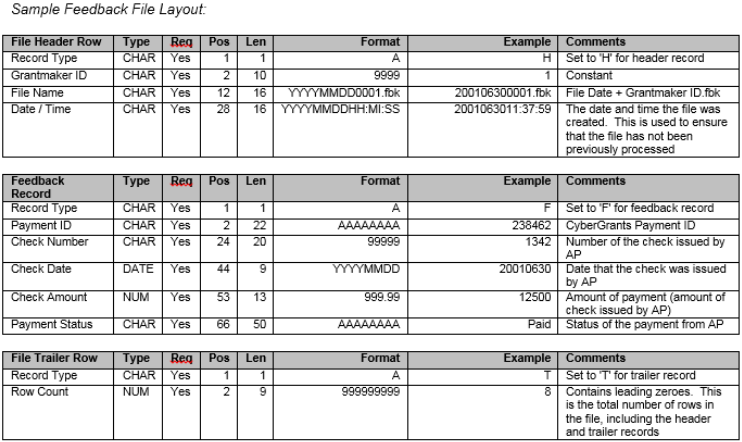
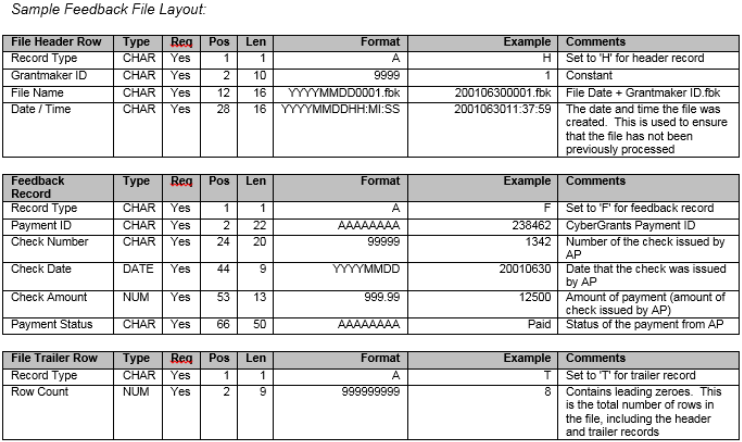
The feedback file updates CyberGrants payments with the information provided by the client’s Accounts Payable department, thereby providing a closed loop process for the grants administrator. AP generates a file containing the actual check date, check number, check amount, and status of the payments after processing has been completed.
Implementation of the feedback file is optional; however, it does have the following benefits:
- Allows check number to be automatically inputted into CyberGrants for improved payment tracking.
- Improves internal reconciliation since it offers confirmation that checks were actually issued.