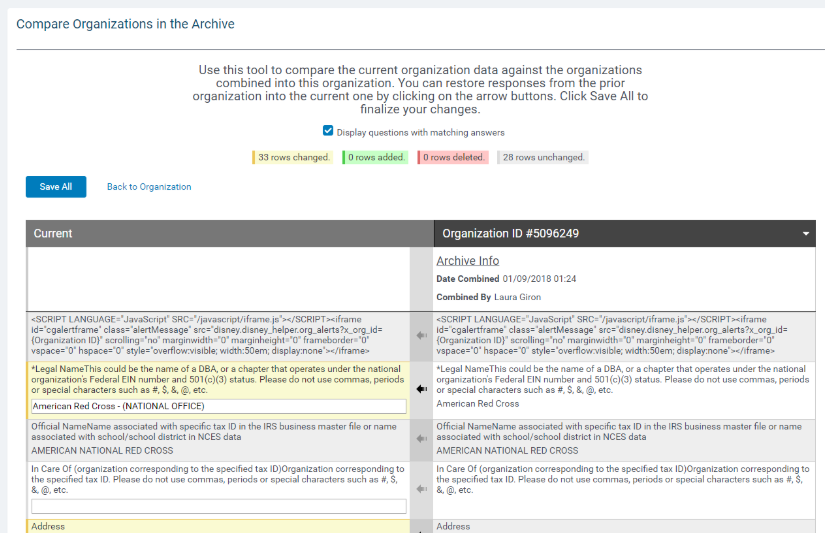
Organization Combination History When one organization is combined into another all of its transactions - i.e. requests, gifts, events, deductions, etc. - are automatically moved first to their new organization before deleting the original organization. In order to maintain consistency in the organization information, none of the original organization data was transferred. While the combination was successful, there have been instances where the original organization had responses or file attachments that were better than what was available in the target organization. Organization Combination History allows you to get that information back.
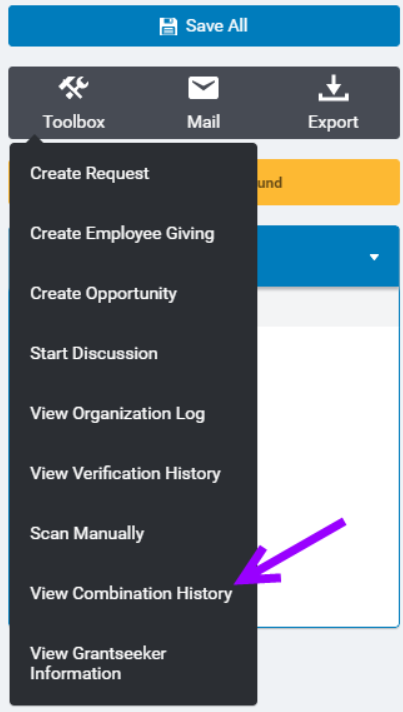
To view the organization combination history, click into the toolbox within an organization record and click, "View Combination History."
Any time an organization is combined, we will automatically back up its responses. These responses can then be reviewed and recovered by pulling them up in the destination organization record. CyberGrants will automatically highlight the additions, deletions, and differences between the current and prior versions. If you see a response that you want to restore just click the arrow to overwrite the current one with the earlier information. Everything is recoverable - including file uploads.
Compare the current organization data against the organizations combined into this organization. You can restore responses from the prior organization into the current one by clicking on the arrow buttons. Click "Save All" to finalize your changes.