Giving History Status messages are configured in the employee giving proposal type in:
- Donor Setup Tab
- Donor Settings
- Giving History Status Message Customization
Each status is configured within each relevant proposal type and statuses are applicable to both volunteerism and giving.
The example below shows the messaging for a Matching Gifts Proposal:
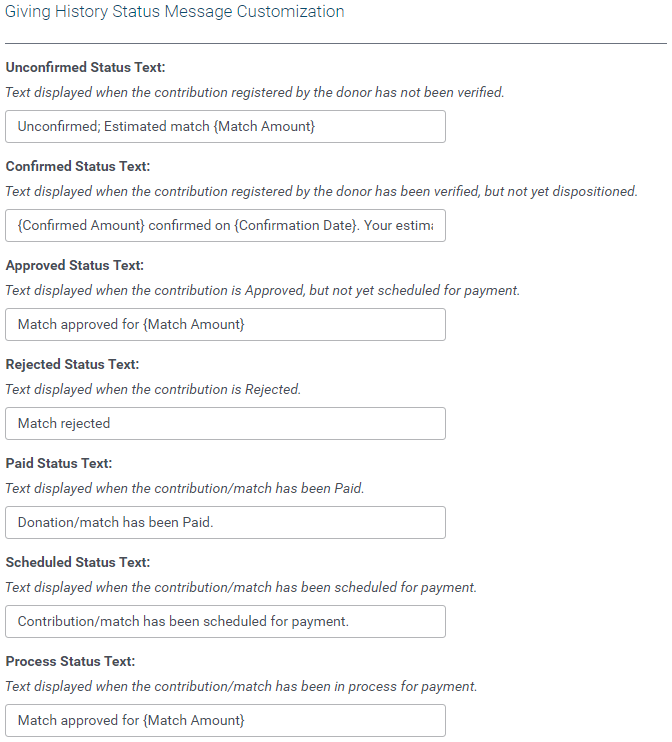
The default option are:
| Status | Default Description |
|---|
|
Unconfirmed Status Text:
Text displayed when the contribution registered by the donor has not been verified.
|
Contribution has not been confirmed by the organization.
|
|
Confirmed Status Text:
|
Contribution has been verified by the organization, and is pending administrator review.
|
|
Approved Status Text:
|
Match Amount of {Match Amount} has been approved, but not yet scheduled for payment.
|
|
Rejected Status Text:
| Contribution has been declined with the following comments: {Approval Comments} |
|
Paid Status Text:
| Match Amount of {Match Amount} has been paid to organization via Payment #{Payment Check Number} on {Payment Check Date}. |
|
Scheduled Status Text:
| Match Amount of {Match Amount} has been approved and will be paid during next disbursement cycle. |
|
Process Status Text:
Text displayed when the contribution/match has been in process for payment.
| Match Amount of {Match Amount} has been approved and will be paid during next disbursement cycle. |


