Set preferences (filters and search results columns)
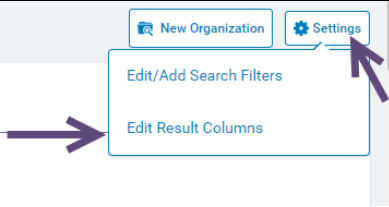
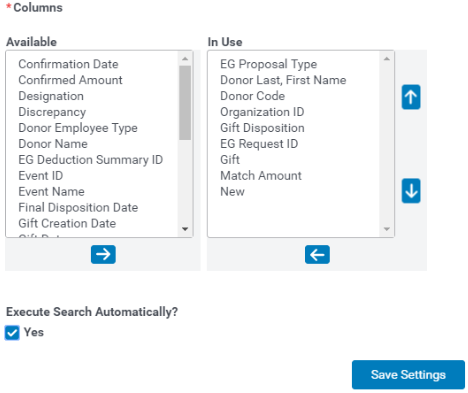
- Choose columns:
- Gift Fiscal Year
- EG Proposal Type (program name)
- Organization ID
- Organization Information
- Donor Code
- Donor Last, First Name
- EG Request ID (reference id)
- STATUS: Gift Disposition
- Internal – Employee submission from the web
- Pending – Gift record has been saved by the user, or the org has confirmed receipt of gift/hours
- Pending Review – legacy status that will be
- Pending Redirection - Request is on hold waiting for the donor to select a new eligible organization.
- Approved – Request has been reviewed and has reached final approval by an internal user
- Rejected – Request has been reviewed and has reached final rejection by an internal user
- Process – Locks down requests, making them read-only. During review, this or Approved is selected. If approved, then the request can still be changed. (legacy disposition that will be going away)
- Paid – Request has been processed for payment and marked as paid either manually or through feed. (A check number and check date entered into the system)
- Discrepant – Organization has confirmed a different amount than what the employee has registered. This can still be processed for payment, as the match (if available) will register the lower of the two amounts.
- Gift Creation Date (date gift/hours were registered)
- Gift Start/End Date (date gift was given OR hours completed)
- Gift (amount of donation OR hours)
- Designation (if on application and specified by employee)
- Match Amount (if matched)
- Confirmed Amount (org confirmation)
- Confirmed Date (date org entered as confirmed)
- New (link to creating a new eg_request to the org selected)
- Match Amount (Local Amount) (if matched, the match amount in local currency)
- Match Amount (Local Code) (if matched, the local currency of the match)
- Confirmed Amount (Local Amount) (org confirmation in local currency)
- Confirmed Amount (Local Code) (the local currency of the org confirmation
- Gift (Local Amount) (amount of donation in local currency)
- Gift (Local Code) (the local currency of the donation)
Set Filters
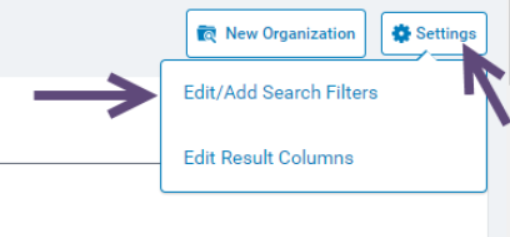
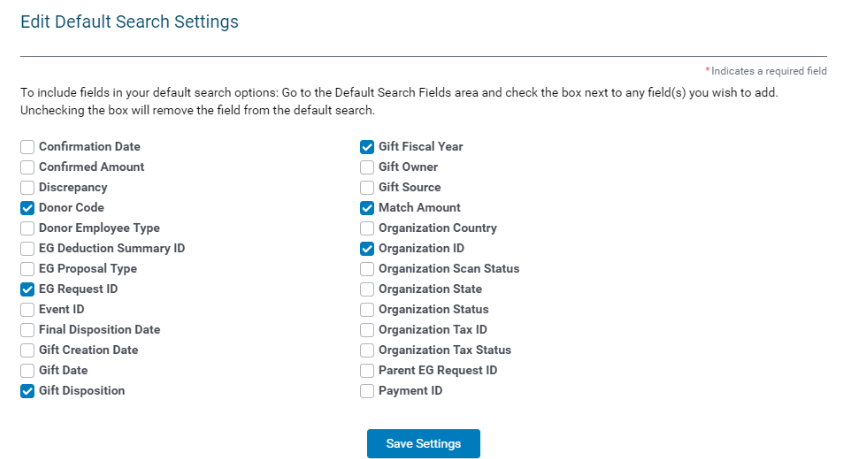
- Choose filters:
- Confirmed Amount (see if $0 confirmations)
- Discrepancy (view in case of rejections)
- Donor Code (pull requests tied to specific employee)
- EG Proposal Type (program specific)
- EG Request ID (pull specific request submitted)
- Gift Creation Date (can enter a range)
- Gift Disposition
- Gift Fiscal Year
- Gift Pending Approval Type (if multiple approval steps, this allows you to see requests pending your approval step)
- Match Amount (see if $0 matches)
- Organization ID (pull all requests under org record)
- Organization Status (based on pending, approved, rejected…)
- Organization Tax Status (if org is ‘non-verifiable’ or tax status changes)
- Match Amount (Local Amount) (if matched, the match amount in local currency)
- Match Amount (Local Code) (if matched, the local currency of the match)
- Confirmed Amount (Local Amount) (org confirmation in local currency)
- Confirmed Amount (Local Code) (the local currency of the org confirmation
SEARCH FUNCTIONALITY: Make Default and Add to Favorite features
- If you run a search that you know you will run all the time, you can use the Make Default option. This will auto-run the search every time you click the EG tab
- Add to Favorites allows you to create multiple searches and add them to a favorite dropdown for easy search access.
- This is used to help with all of the searches needed to review and reject all ineligible requests, where you can then bulk approve all remaining eligible requests. (i.e., $0 match/confirmed amounts – rejected orgs – ineligible org tax status, etc.)
Your saved filter preferences will display on the Main Tab.
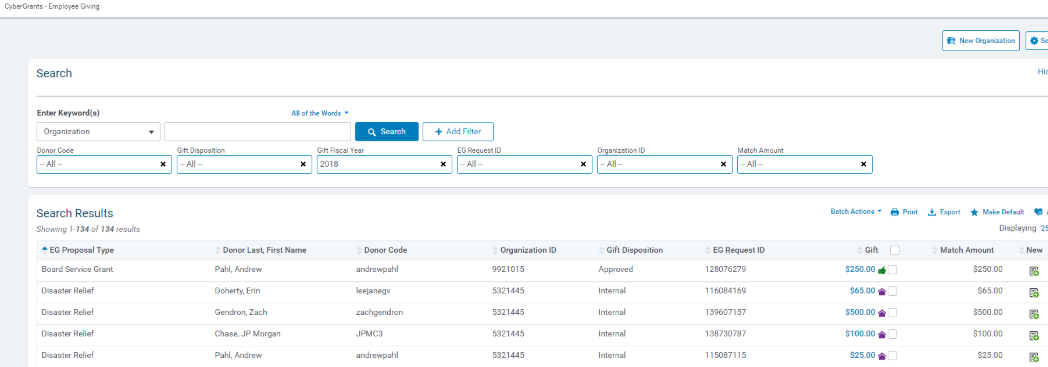
At any time, you can click on + Add Filter to add additional filters or click on X to remove a filter.
Looking for training?
Explore this feature at your own pace - access training video content or watch a recorded webinar by clicking the link below.


