Invite members of your community (e.g. friends, family, consumers, etc.) to participate in volunteerism events sponsored by your company, and or by your nonprofit partners. Community members search and explore your volunteerism events - without a registration - on their own or via the prompting of your employees. Community members can sign up for an event, with a simple registration, to increase the reach and impact of your engagement programs!
We’re looking forward to continuing to expand our capabilities in this area, including future revisions to event manager capabilities and streamlining the search & signup process.
Contact client management team if interested in incorporating community engagement into your suite of engagement programs.
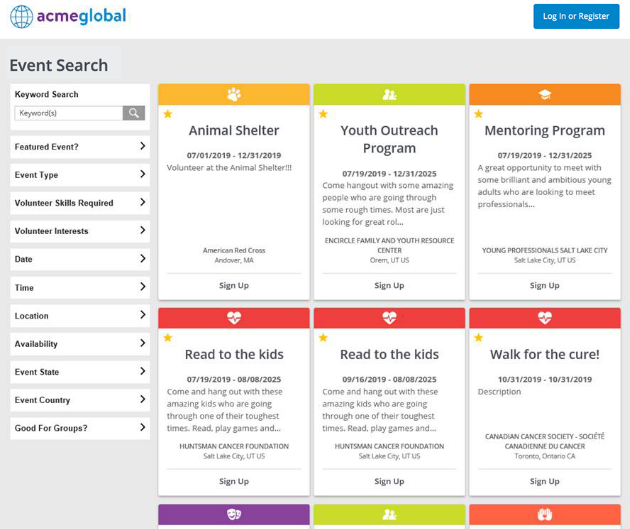
How it Works
- Anyone can browse “community” events without logging in
- Users who select to sign up are first prompted to log in or register
- Self-registered users are designated as a special community member donor type
- Community members only see events, portlets, & portal pages configured as able to see, along with other feature restrictions
Special controls for community users
With this initial release, controls have been put in place to help ensure the right content is available to the right people.
Event creators can decide which events are to be made available outside the company, using a “Visible to Community?” flag. Events will remain visible to only employees by default. This controls not only whether an anonymous user can see the event, but also whether a community member (once registered) can see the events anywhere events are promoted – Event Search, Featured Events, Recommended Events, and the Calendar. This new flag works in conjunction with the other event controls, including the existing “Public Flag” (which controls whether the event is discoverable in search & portlets or requires a direct link) and existing “Allow Friends & Family?” (which controls guests can be brought to the event by the person signing up).
Once logged in, community members can have access to other volunteerism workflows, and then take actions such as viewing their signups or adjusting their profile. Some items areas are locked down by the system automatically, including Team Signup’s Employee Search, Proxy/Impersonation Capabilities, My Photos, CGDS features (My Donation Summary), and Volunteer Match powered by Idealist events.
In addition, community users are automatically excluded from being returned in any employee searches that are used throughout the employee engagement site and are excluded from HR feeds due to the "Exempt from HR" flag being set appropriately, the same as all other self-created users.

Once CyberGrants enables the community module, the special donor type, “Visible to Community?” event fields (plus corresponding report field) are made available to be configured in an account.
A site’s existing portal pages, portlets, donor profile, login page configuration, and programs (proposal types) should be reviewed to expose through configuration those targeting the community (and restrict to employees ones only for internal use).


