Employees want to know what their current match balance is when requesting matches, so they can make informed decisions when deciding how to allocate their company’s matching funds. This information can now be displayed to the user while they are filling out their application by activating the Graphical Balance Remaining widget. This widget displays the same information that appears in the Donor Balance portlets (often used on a programs’ portal pages) which can show the balances across multiple programs.
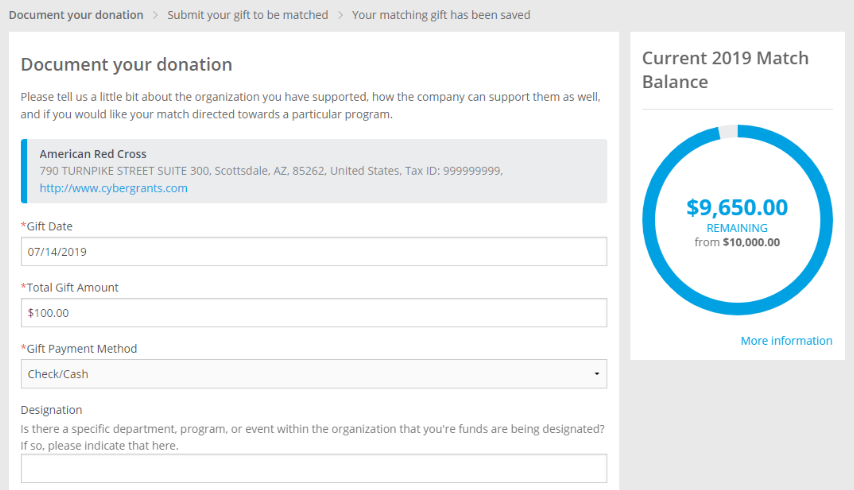
Graphical balance remaining widget
The widget appears on the Organization Search, “Checkout” payroll pages, and editable individual program pages. It does not currently include the projected impact of the current application on the balance, due to the often delayed or complex nature of the calculation.
This is not currently available for team programs or accounts that have multiple currencies.
 Configuration Note
How to enable the Graphical Balance Remaining Widget
Employee Giving Proposal Type > Donor Setup > Display Settings > Display Graphical Balance Remaining in application
Display Graphical Balance Remaining in application: Check to include in any Proposal Type this should be displayed in.
Graphical Balance Remaining Data URL: If a special calculation is appropriate for a program, a custom calculation designed by our service delivery team can be added to the program.
Match limit configurations allowed with Graphical Balance Remaining Widget
The proposal type must have the Match Configuration set to either Dollars or Hours to display the widget. In addition:
- Request a match made elsewhere – i.e. programs where a user is applying for a match for a donation made elsewhere. No special configuration is needed, the existing Donor Rules should already contain match limit
- Credit Card application or Payroll application – i.e. programs where a user is making a gift in CyberGrants, with a subsequent record created for the match (of a different proposal type). 1) Add the Match Limit to the Donor Rules 2) CyberGrants must set up linking of programs to link the gift proposal types to the match proposal type
Limitation: If a program cannot use the standard Donor Balance portlet, such as having scripts outside of the standard product determining a balance, this feature also cannot be used without additional custom calculations.
Since matching programs are often nuanced, we recommend consulting your Client Management team to confirm whether your current programs can use this without further configuration.


