Employees tend to donate in the same patterns year over year. With this portlet the most recent monetary donations can be brought to their attention quickly by displaying them in the Contribute Again portlet. This allows employees to easily repeat the same transactions by copying the information from applications from the prior two years into a new donation. Special care is taken to display Active payroll pledges at the top so an employee can have the option to quickly change or cancel their deductions. Contribute Again is meant to compliment but not necessarily replace the Giving History portlets where the employees can look to see more detail and older transactions.
 Configuration Note
Add the Contribute Again Portlet
Admin > Portal Pages > Donor Portal > View/Edit Portlets
Activate and add the Contribute Again portlet to the desired portal pages.
IMPORTANT: Use the standard Advanced configuration options to limit the proposal types that this portlet displays, in order to only show programs relevant to the page that it is on.
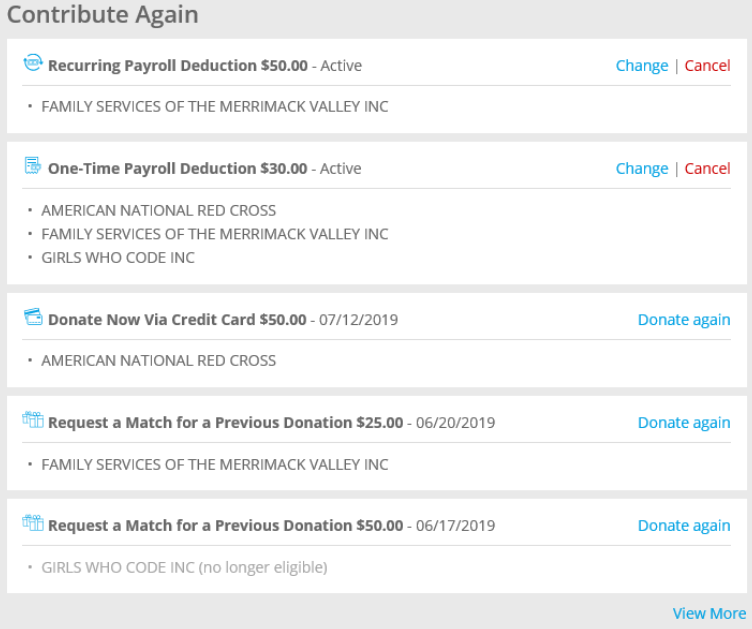
Contribute again portlet
This table provides further details around the types of activity that appears in the Contribute Again portlet and under what circumstances. The links will take users to the standard workflows for Renewal, Change, Cancel, or “clone” (called Donate again here).
|
Program Type
|
Statuses
|
Link
|
Value
|
Date Value
|
|
Payroll pledge, recurring, employee funds
|
Closed or Canceled (and transmitted to payroll)
|
Renew*
|
Total Deduction Amount
|
Activation Date
|
|
|
Active or Pending
|
Change and Cancel (if allowed)
|
Total Deduction Amount
| “Active” (no date) |
|
Payroll pledge, one time, employee funds
|
Closed or Canceled (and transmitted to payroll)
|
Donate Again*
|
Total Deduction Amount
|
Activation Date
|
| |
Active or Pending
|
Change and Cancel (if allowed)
|
Total Deduction Amount
|
“Active” (no date)
|
|
Credit Card - One time, single organization program, employee funds
|
Any but Rejected/Canceled
|
Donate Again
|
Gift Amount
|
Start Date
|
|
Credit Card - One time, multiple organizations program, employee funds
|
Any but Rejected/Canceled
|
Donate Again
|
Total Donation Amount
|
Start Date
|
|
Credit Card - Recurring, single organization program
|
Cancel or Cancelled
|
Donate Again**
|
Donation Amount
|
Start Date
|
|
|
Active
|
Cancel
| Donation Amount |
Active
|
|
Indirect donations match, company funds
|
Any but Rejected/Canceled
|
Donate Again
|
Match Amount
|
Start Date
|
* If pledges are active for a specific proposal type, others of the same proposal type will not display the option to Donate Again/Renew, as only one pledge can be Active at a time.
**Credit card actual donations for recurring are excluded if program is no longer active.
If any organization is not eligible, it will follow the standard ineligible workflows and alert the user on the portlet and in the workflow that the organizations are ineligible.
Note, specifically excluded from this portlet are actual payroll feedback records and non-giving transactions - e.g. signups.


