Client-Specific Exchange Rates
CyberGrants has previously offered standardized rate conversions for the exchange of foreign currency. As we continue to expand globally, we are now offering the ability for a client to set their own conversion rates across all programs using a standardized approach.
When configuring rates, an effective date can be set – allowing clients to update the rates as desired and also update in advance of an upcoming rate refresh without having to worry about impacting the current rates.
To be configured for client-specific rates, engage with your client management team.
For clients operating grant programs in multiple currencies, the Request summary pane is being updated to highlight the effective currency of the grant request. The updated view will include both the foreign currency amount along with the base currency amount. For both amounts, the currency type code will be clearly displayed to avoid any confusion between the amounts.

At the time of a request submission, the effective currency is the requested currency type. Once a grant is pending or approved, the effective currency is the granted currency type (which will often be the same as the requested).
 Configuration Note
This summary pane enhancement can be enabled in conjunction with the new approval/payment workflow changes. To be enabled for multi-currency support, please coordinate with your client management team.
New Currency Fields
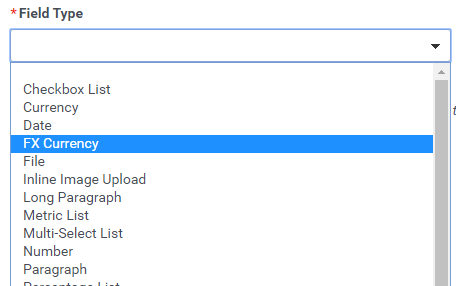
To continue improving the visibility into the currency type, new field types for foreign currency are being created for use within Requests. When displayed, the currency code will always be displayed alongside the amount for clear visibility. The new field type supports numeric entry without the use of a currency symbol (as the currency type is more accurately identified using the code).
The existing local currency type fields for Requested Cash will be automatically updated to the new field type.
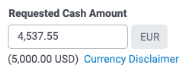
For internal users only, a disclaimer link is available to provide the user with clarifying detail regarding the currency conversion.
The existing local currency type fields for Requested Cash will be automatically updated to the new field type. New custom fields can be created using the new field type as well (within Requests only).
Configuration Note
The currency code indicator on the FX currency fields is populated by the current standard field for the Request Amount Currency Code. It is recommended to order the proposal type questions to display the currency code selection prior to the currency fields.
Currency Handling in Approval and Payment Workflows
In additional to expanding visibility, CyberGrants is adding the capability to manage the grant approval and payment workflow in foreign currency. Similar to the summary pane enhancement, grant requests operating in multiple currencies will focus on enforcing the effective currency of the grant.
When a grant is requested, the effective currency is set to be the currency of the request. The approval and the payments will default to using the effective currency.
During the approval process, the currency type can be changed by the grant administrator reviewing or processing the request.
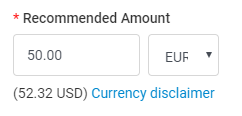
If a non-void payment is pending on the request, changing the currency type will not be allowed. All payments must first be voided.

Configuration Note
This summary pane enhancement can be enabled in conjunction with the summary pane currency enhancements. To be enabled for multi-currency support, please coordinate with your client management team.
With the approval and payment workflow change, the client management team will work closely with you to ensure that any inflight approvals and payments are not negatively impacted during the switchover.
Summary Pane Refresh
As part of the Multi-Currency Enhancements for Grant Programs, we are refreshing the summary pane displayed throughout various pages in the internal application. This refresh aims to provide better alignment of the content within the summary pane, keeping the core content at the focus.




