Privacy settings allow a donor control over what personal information is shared with a non-profit organization. This impacts the check detail portlet and the CSV file that a non-profit can download to see the individual details of a check that they have received.
Payment Detail Portlet:

Check Details:
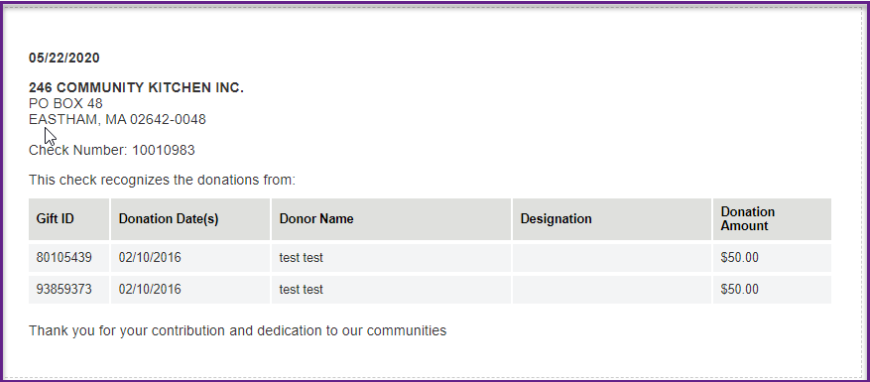
There are 3 ways a donor can select their privacy preferences.
- Privacy Settings are pulled from Donor/HR Feed
- Donor manually Enters Privacy Settings on Profile Record
- Donor manually Enters Privacy Settings on Gift Level. If this is provided then it will override any profile level settings.
Privacy Options
|
Description
|
Privacy Settings pulled from Donor/HR Feed
|
| Anonymous | Share No information with the organization |
| Full Name (HR) | Share JUST my first and last name with the organization |
| Full Name and Address (HR) | Share JUST my name and address info with the organization |
| All Info (HR) | Share ALL of my info - i.e. name, address, phone, and email - with the organization |
Donor manually Enters Privacy Settings on Profile Record
|
| Anonymous | Share NO info with the organization |
| Full Name (Profile) | Share JUST my first and last name from the organization |
| Full Name and Address (Profile) | Share JUST my name and address info with the organization |
| All Info (Profile) | Share ALL of my info - i.e. name, address, phone, and email |
Donor manually Enters Privacy Settings on Gift Level
|
| All info (User Configured) | Share ALL of my info - i.e. name, address, phone, and email - with the organization; pull this info from what I enter on the transaction |
Important
- It is recommended to not to use Privacy Settings for gifts that require confirmation.
- In the event no preferences were set at either level, the portlet will minimize the data displayed to organizations to only include the donor’s first name, last name, and postal code. This is the baseline information nonprofit organizations require for validating or approving matching gifts.
- The card information entered in credit card workflows is not affected by this setting and is only used for credit card processing.


