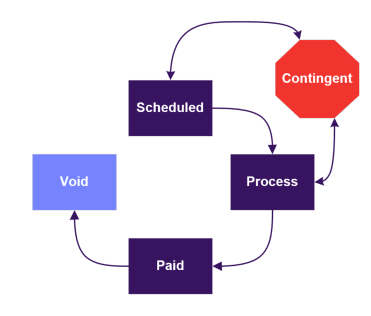
Figure 1 CGDS Payment Cycle
Payment Status Diagram: Scheduled -> Process: 1. Contingent OR 2. Paid. If Contingent -> Scheduled. If Paid -> Void. OR Scheduled -> Contingent -> Process -> Paid.
- Scheduled
- Payment has been scheduled and will be picked up in the next payment cycle based on the request check date. When the payment cycle runs, it includes payments in Scheduled status that have a request check date on or before the current date
- If the request check date is in the past and did not get pulled into the current payment cycle, this is an indicator that either the payment is a reissue or it failed to make its way into the invoice
- Reissue: the payment record is cloned and retains the prior request check date and will be included in the next payment cycle
- Other: if it is not a reissue, CG has been made aware of the issue and is working on correcting the data so that it can be included in the next payment cycle
- Common reasons: Payee is inactive or missing data, data quality issues, organization's tax status is ineligible
- Process
- Payment has been batched and included in a funding invoice. The client will receive the invoice no later than the second Thursday of the month.
- Payments will remain in Process status until the invoice is fully funded by the client.
- Paid
- The client has funded the invoice and the payments have been sent to the bank to pay the organizations
- If an organization disputes and refuses funding after paid, refunds will not be processed. The organization must accept the payment as the transaction cannot be reversed.
- The check date indicates when the payments were sent to the bank
- Once the check has been cashed, the payment sub status will state the payment as cleared
- Contingent
- A payment can be in Contingent status for a few different reasons
- Grant payments can be manually set to this status because the client is waiting for additional information from the organization
- The payment failed to make its way into the invoice for that month
- Common reasons: Payee is inactive or missing data, data quality issues, organization's tax status is ineligible
- CG is in the middle of the reissue process and is awaiting confirmation from the bank that the previous check can be voided
- Once confirmation is received, the payment status changes to Scheduled
- On average this takes 2-4 weeks
- Void
- Payments can be in Void status for a few different reasons
- ACH: We received a return from the bank based on the organization's account details provided so we need to reissue
- Check: Has not been cashed (either stale or returned) and we are processing a reissue/redirection
- Once a payment is voided and the redirection process is initiated, the redirection is inexorable.
Back to Payments and Disbursements
Back to Homepage


