Turning on or off a recurring credit card for a program can be done within the credit card proposal type by selecting the frequency options available to the donor (monthly, quarterly, or yearly). If only one time is selected, the frequency field will not display at all. If only one recurring frequency (monthly, quarterly, or yearly) is available, it will show as a read-only value to the donor.
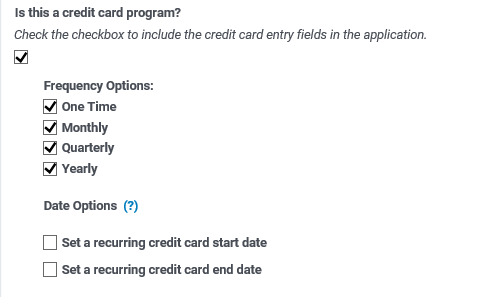
If any of those options are selected, date options will appear to allow controlling the start and end date options available to users.
- To allow users to select their own donation window (including leaving the recurring donation ongoing), leave the date options blank.
- To set a Start Date, check only the Start Date box and enter a date. This will be the earliest that the Start date can be set.
- To set an End Date, check only the End Date box and enter a date. This will be the latest that someone can set their end date.
- To set a donation window, check both boxes and enter dates.
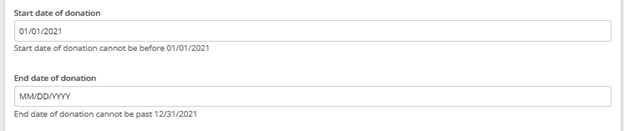
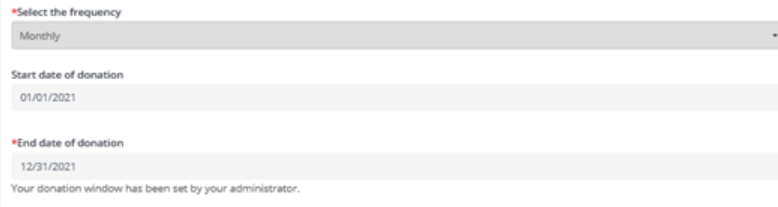
- To lock the Start and/or End Date so users cannot change them, select the forced option. The donor will only see the values with a note that it has been set by an administrator.
Additional Notes
- Not available for the "payroll" (multiple organization) proposal types
- Disabling recurring credit card frequencies will only make them no longer available within the workflow, but it will not stop existing subscriptions from continuing.
- My Donation History in the profile will be active if there is an active proposal type with a recurring credit card
- It is recommended that you update the qualifier of your donation field to something such as: "Please enter the amount of your donation. (The frequency of this donation will be set in the next step.)"
- For legacy programs that are moving to recurring credit card giving, it is recommended to update the workflow configuration to remove any reference to a gift id, as this is now dynamically displayed in the credit card information area as “Donation ID” or “Recurring ID” based on whether it is a one time or recurring donation. This can be found in Admin > Employee Giving Proposal Types > [Proposal Type] > Donor Setup > Display Settings > Proposal Type Submission Screen Instructions and Proposal Type Submitted Instructions.
- Recurring credit card transactions can always be canceled, regardless of configuration
- Since CyberGrants handles all credit card email confirmations, it is recommended to tailor existing emails to contain program-specific content, to complement the standard email content.
- Misconfiguration will result in donors being unable to access the workflow. (e.g., not having the required credit card processor set up for CGDS)
- All standard configuration steps for a credit card should be followed, including setting approval rules to set the gifts to auto-approved.


