The visibility settings affect the display of organizations available for selection when using organization search.
To configure Search Results Visibility settings
- On the Program Configuration tab, click the Donor Setup tab.
- Under the Donor Setup tab, click the Organization Search hyperlink.
-
In the Search Result Display - Existing Organizations section, select visibility settings for
- The Visibility Level for Pending Existing Organizations dropdown menu.
- The Visibility Level for Rejected Existing Organizations dropdown menu (see Figure 1.)
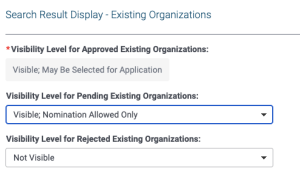
Figure 1 Existing Organization Search Visibility Settings
-
In the Search Result Display - New Organizations section (see Figure 2), select the appropriate options:
-
The Visibility Level for New Organizations Meeting Requirements dropdown menu.
-
The Visibility Level for New Organizations Not Meeting Requirements dropdown menu.
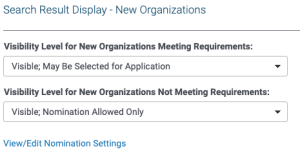
Figure 2 New Organization Search Visibility Settings
-
Click the Save button to save your settings.
-
Click the Done button to return to the previous page.


