Table of Contents
If a non-profit organization is unable to receive a grant, the funds are not refunded or directly credited to the client's account. CyberGrants issues a Credit Memo in such cases, which is automatically applied to future employee donations, company matches, and grant payments. These Credit Memos can be tracked through the Credit Memo Console on the CyberGrants Admin tab by authorized administrators.
The Credit Memo Console allows administrators to access the live status of CGDS Credit Memos that have been created since September 2022 (see Figure 1.) Supporting information and documentation are available on the console to streamline the timely and accurate application of credits to previously unfunded invoices before disbursement.
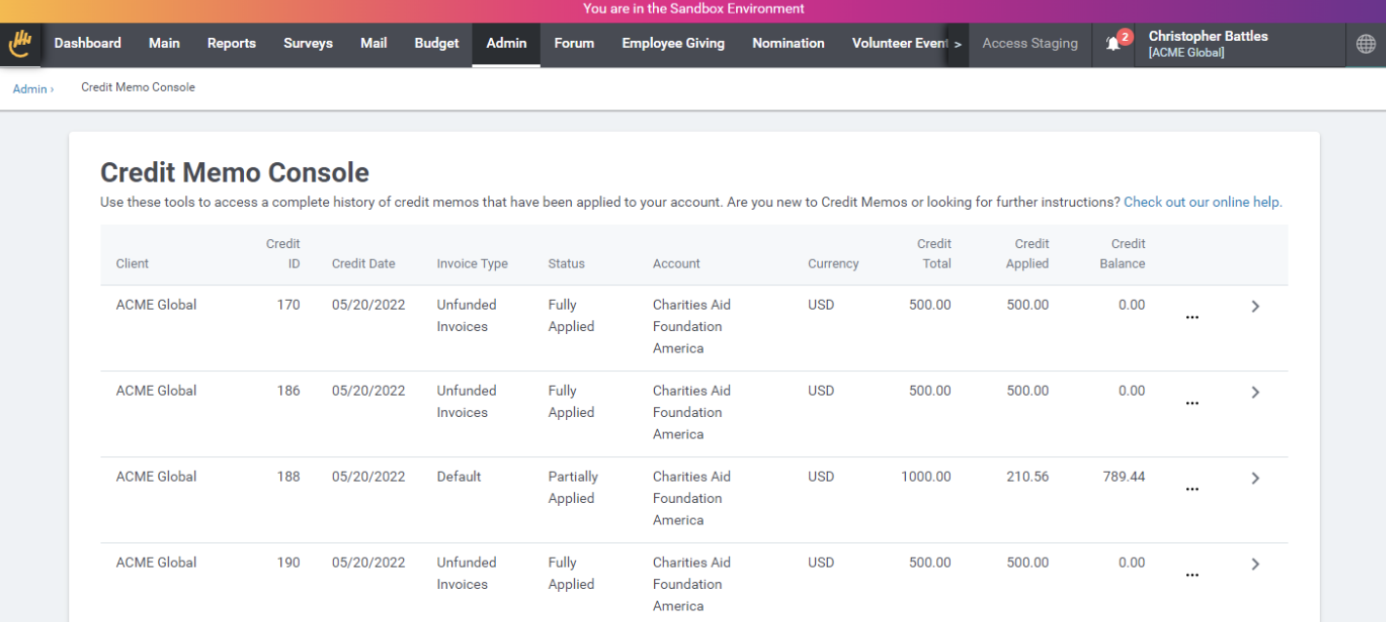
Figure 1 The Credit Memo Console Interface
Accessing the Credit Memo Console
Authorized administrators can access the Credit Memo Console by clicking the Credit Memo Console hyperlink on the CyberGrants Admin tab. Additional users can be granted access to the console with the Ability to view Funding Invoices & Credit Memos setting that can be added to a User Role. Those with security permission to access the console can do so from the Admin tab or using a link located on the PDF version of a Credit Memo.
Note: The link URL will appear as: www.cybergrants.com/payments/credits.
Learn more about user roles and privileges
Console Columns
The following table describes each of the columns on the console interface.
|
Column Name
|
Description
|
|
Client
|
Displays your company’s name. Use it to discern between companies if you can access multiple Grantmakers in CyberGrants.
|
|
Credit ID
|
Displays the unique numeric identifier for a particular Credit Memo. Make sure to include this in any correspondence regarding a specific credit.
|
|
Credit Date
|
Displays the date the credit is available to the client.
|
|
Invoice Type
|
Displays the client configured Funding Invoice Type. Use it to discern between different types of invoices in the account.
|
|
Status
|
Displays the real-time status of a particular Credit Memo.
- New: Memo has been created but has not been applied anywhere
- Partially Applied: Memo has been applied to at least one invoice but still has a remaining balance that can be applied elsewhere
- Fully Applied: Memo has been fully applied and has no remaining balance
|
|
Account
|
Displays the name of the bank account where the credit is to be applied. Options include Charities Aid Foundation America, Charities Aid Foundation Canada, and CyberGrants SPV, LLC.
|
|
Currency
|
Displays the currency of the bank account where the credit will be applied.
|
|
Credit Total
|
Displays the total amount of credit owed to the client.
|
|
Credit Applied
|
Displays the amount of the credit applied to one or more invoices.
|
|
Credit Balance
|
Displays the credit total minus the credit applied and indicates remaining funds that can be applied to invoices.
|
Exploring the Credit Memo Submenu
Each Credit Memo has a submenu that reveals additional information and documentation. Click the ellipsis  icon to explore the options.
Credit Memo PDFs
A PDF document for each Credit Memo is available by clicking the Download PDF Credit Memo hyperlink. The document reflects the current status, remaining balance, and reason for the credit memo (see Figure 2.) It also includes a breakdown of where it has been applied at the end. The billing name and address on the Credit Memo correspond with the Invoice billing name and address information on the Funding Invoice Types page.
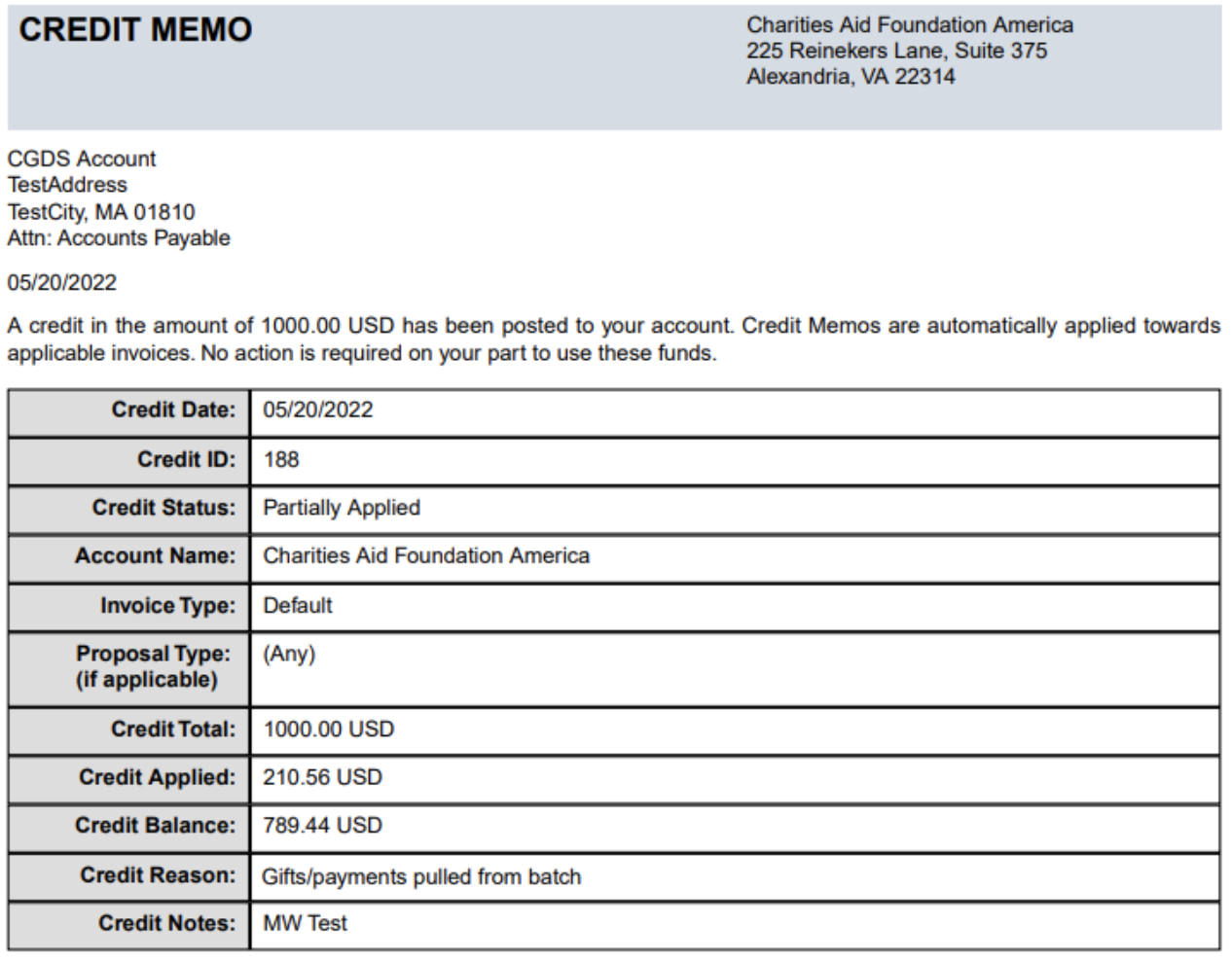
Figure 2 Credit Memo Sample PDF
Credit Memo Detail Drawers
Click the arrow icon on each credit memo to reveal additional information, including any proposal type or funding source restrictions, why the credit was issued, and external comments left by the CGDS Disbursements team (see Figure 3.)
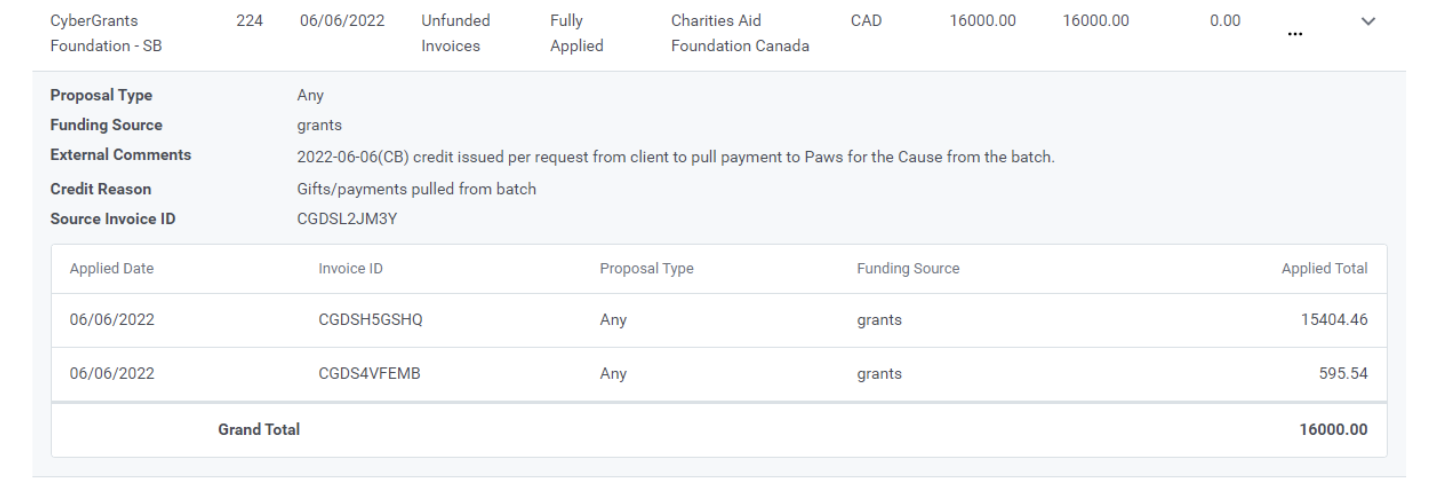
Figure 3 Credit Memo Drawer View
Credit Memo Drawer Columns
The following is a table describing each of the columns in the Drawer view of the console.
|
Column Name
|
Description
|
|
Proposal Type
|
Indicates if the Credit Memo can only be applied to a particular proposal type. The Any value means that it can be applied to any proposal type.
|
|
Funding Source
|
Indicates if the Credit Memo can only be applied to a particular type of funding. e.g., Employee, Company, or Grants.
|
|
External Comments
|
Displays comments provided by the CGDS Disbursements team to clarify the reason or status of the Credit Memo
|
|
Credit Reason
|
Indicates why the credit was issued. Valid reasons include:
- Client funded the incorrect account
- Client overfunded the correct account
- Gifts/payments pulled from the batch after funding has occurred
- Pre-funding
|
|
Source Invoice ID
|
Displays the original invoice that triggered the need for the Credit Memo to be issued. This value can be blank.
|
|
Applied Date
|
Displays the date the credit memo was applied to this invoice.
|
|
Invoice ID
|
Displays the ID of the invoice that is receiving this credit.
|
|
Proposal Type
|
Indicates if the Credit Memo was applied to a particular proposal type.
|
|
Funding Source
|
Indicates if the Credit Memo was applied to a particular funding source. Good sources include:
- Employee: Donor credit card and payroll gifts
- Company: Matching gifts from the company
- Grants: Grants issued by the company
|
|
Applied Total
|
Displays the amount of credit that was applied to this invoice.
|
Back to Credit Memos
Back to Homepage


