Administrators can assign donor roles directly from a donor's record using the Modify/Search Donors tool in the Admin tab. Assigning a role gives the donor specific access based on the role’s configured permissions.
Follow these steps to assign a donor role:
Step 1: Navigate to the donor search screen
Enter the Bonterra CyberGrants production environment and select the Admin tab. Then, choose User Management > Donors > Modify/Search Donors.
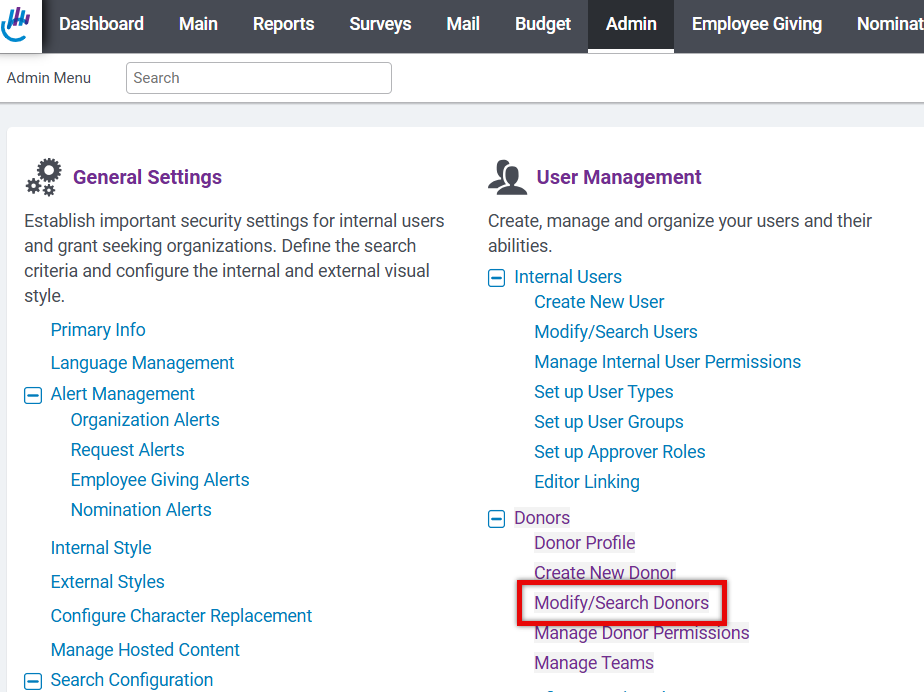
Step 2: Search for the donor
Use the search field to locate the donor by entering the:
- Donor’s name
- Donor ID
- Donor’s email address
You can also filter your search by:
- City
- State
- Country
- Employee Type
- Company
- Donor Role
Click Search to view results.
Step 3: Open the donor record
From the search results, click the donor’s name to open their full record.
Step 4: Assign the donor role
Scroll to the Donor Role field and use the dropdown menu to select the appropriate role.
Step 5: Save your changes
Scroll to the bottom of the record and click Save.


