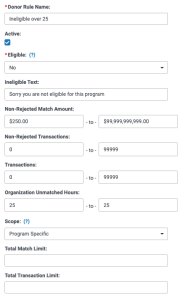
Donor rules control the eligibility for an employee to be able to redeem a volunteer match through the Dollars for Doers program.
For more information, view Donor Rules in our help center
Common Donor Rule Configuration Scenarios
Each Hour Equals a Dollar Amount, No Min
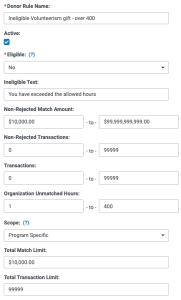
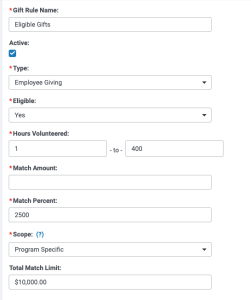
For every hour between one and 400, the employee can request a $25 match up to $10,000. After 400 hours have been used, the employee can no longer request a match.


Each Hour Equals a Dollar Amount, Min Amount to Grant
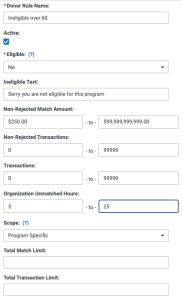
After logging at least five hours, for every hour between five-25, the employee can request a $10 match up to $250. After 25 hours have been used, the employee can no longer request a match.



Group of Hours Equals a Dollar Amount
After logging at least 10 hours, for every 10 hours, the employee can request a $100 match up to $500. The maximum number of matches is five. After 50 hours or five total matches have been used, the employee can no longer request a match.

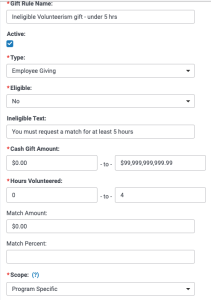


Specific Thresholds
After logging a minimum of 10 hours, the employee can request a volunteer match at 10 hours, 25 hours, or 50 hours. Any hours below 10, between 11-24, 26-49, or above 50 hours are not eligible. (For example, they cannot request a match at 15 hours or 32 hours)

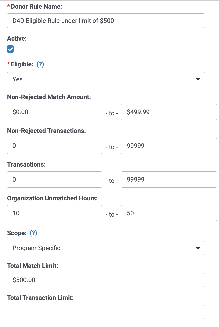


Rolling Thresholds
After logging a minimum of 15 hours, the employee is eligible to request a grant and up to 60 hours.

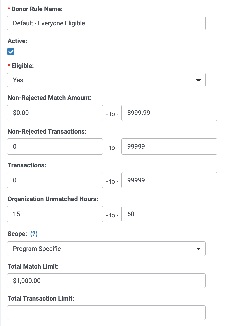


One Grant, Set Dollar Amount
After logging a minimum of 25 hours, the employee is eligible to request a grant for $250. After that, they are no longer eligible to request a grant regardless of the number of hours they have logged.