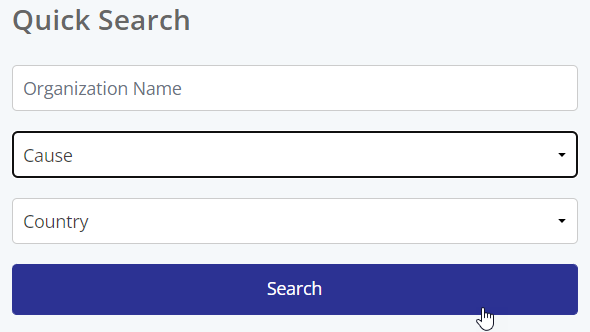
Employees (donors) can search by cause through the organization search portlet.
- When searching for opportunities through the standard organization search portlet, donors can choose to filter their search results by Cause
- Filtering by Cause does not change any of the existing eligibility or search configuration applied to proposal types
- Click Cause and select the desired Cause, then click Search
- This filter is optional; donors do not need to select it to return results
- Donors may select only one Cause from the search portlet
Related Content: Learn more about organization search here
Search by Cause in organization search
- When searching for opportunities to donate to, donors can choose to filter their search results by Cause
- When using Advanced search, donors must input either an organization name or Cause, as well as a country to search; donors may also use only a tax ID to search
Related Content: Learn more about organization search here
Search by Cause in event search portlet
- When searching for opportunities through the standard event portlet, donors can choose to filter their search results by Cause
- Select one Cause from the search portlet and click Search
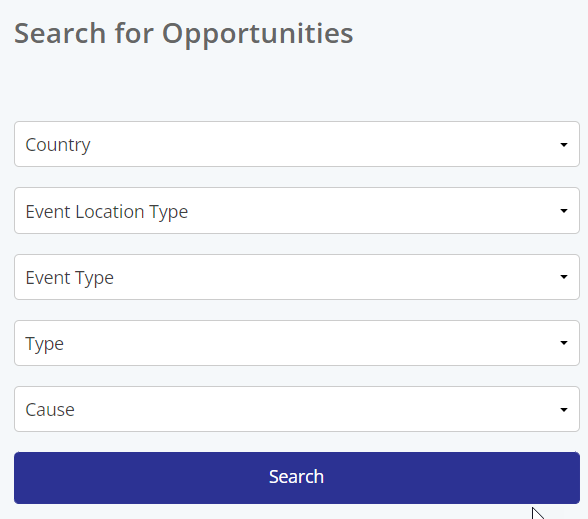
- Note: Filtering by Cause does not change the existing eligibility or search configuration applied to proposal types
- This filter is optional; donors do not need to select it to return results
Related Content: Learn more about event search here
Search by Cause within event search results
- When viewing event search results, donors can further refine the events they see by selecting one or more Causes
- Select one or multiple Causes to filter search results
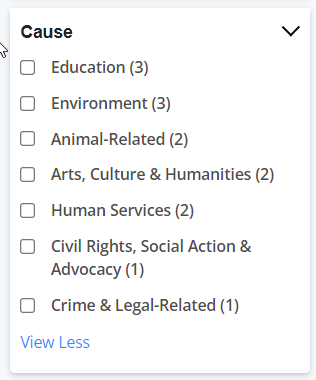
- Selecting multiple Causes will return any Causes that have any of the selected Causes
- Only the Causes applied to events that match other search criteria will be displayed within the Cause
- If no Causes have been applied to any events that appear within search, the Cause filter will be empty
- Causes assigned to the event are displayed within the event card
Related Content: Learn more about event search here


