Workflow Statuses represent a request’s position in the approval process—such as Submitted, Under Review, or Approved.
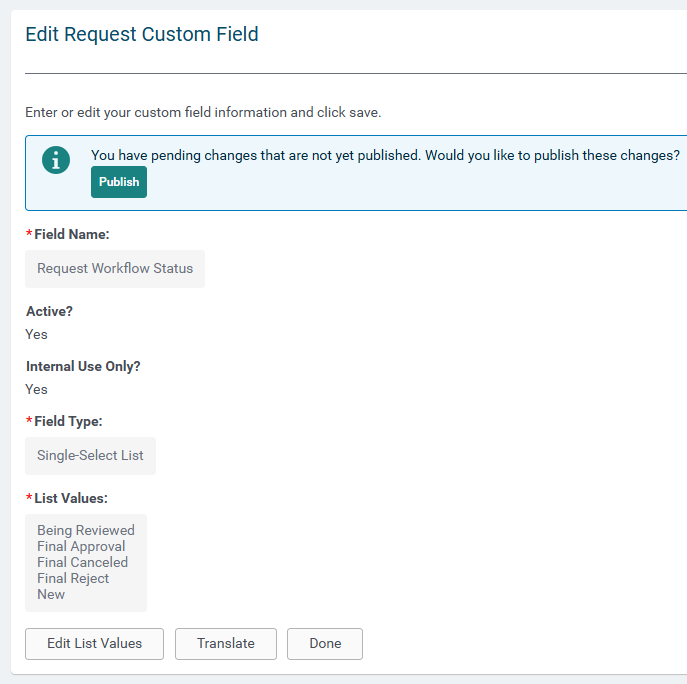
Workflow Sub-Statuses provide additional detail to describe the specific actions or milestones within that stage (for example, Shipment Scheduled or Funding in Progress).
When to use Workflow Statuses
Workflow Statuses are especially useful for:
- Programs with multi-step approval processes.
- Administrators who want clear visibility into where requests stand.
- Simpler workflows where organizations prefer to use their own terminology.
Manual Overrides
Authorized users can manually override a workflow status when unique circumstances require it. All overrides are captured in the audit trail for reference and reporting.
Workflow Status Triggers
Workflow Status changes can be triggered by specific events, including:
- The external submission of a request.
- A change in disposition.
- A change in the Pending Approval Type ID.
Event Configuration Details
- Not all events must trigger a change—if none is configured, the status remains as-is.
- Multiple events can map to the same workflow status (for example, Legal Approval and Finance Approval may both trigger Compliance Review).
- Dropdown menus on the configuration page show only active Workflow Status values.
System Behavior
Workflow Statuses and Sub-Statuses are informational only and do not affect payments or prevent other actions. Payments continue to be based on disposition settings.
Statuses can also be used in:
- Audit Trail reporting.
- Search filters and columns on the Main tab.
- Ad hoc reports and email merge fields.
Implementation Guidance
If your site includes extensive customizations that overlap with workflow behavior, review them before enabling Workflow Statuses to ensure compatibility.
Custom or legacy workflows may require support review before implementation.
What else do you need help with?
Not what you're looking for? Navigate to Understanding Workflow Statuses and Sub-Statuses


