The AP Feed Extension enhances your CyberGrants platform by establishing an automated two-way data exchange between CyberGrants and your organization's Accounts Payable system.
- This extension streamlines the payment process by automatically sending payment details to your AP department and receiving confirmation when payments have been processed.
Core Functionality
The AP Feed Extension creates a seamless flow of payment information through:
- Outbound Data Feed - CyberGrants automatically sends payment information to your AP system for scheduled payments that meet specific criteria.
- Inbound Return Feed - Your AP system sends back confirmation data after payments have been processed, including check numbers, payment dates, and amounts.
- Automated Status Updates - Payment records in CyberGrants are automatically updated based on the feedback received from your AP system.
This functionality ensures that payment records in CyberGrants accurately reflect the actual payments processed by your AP department, creating a reliable record for auditing and reporting purposes.
Key Components
Outbound File Structure
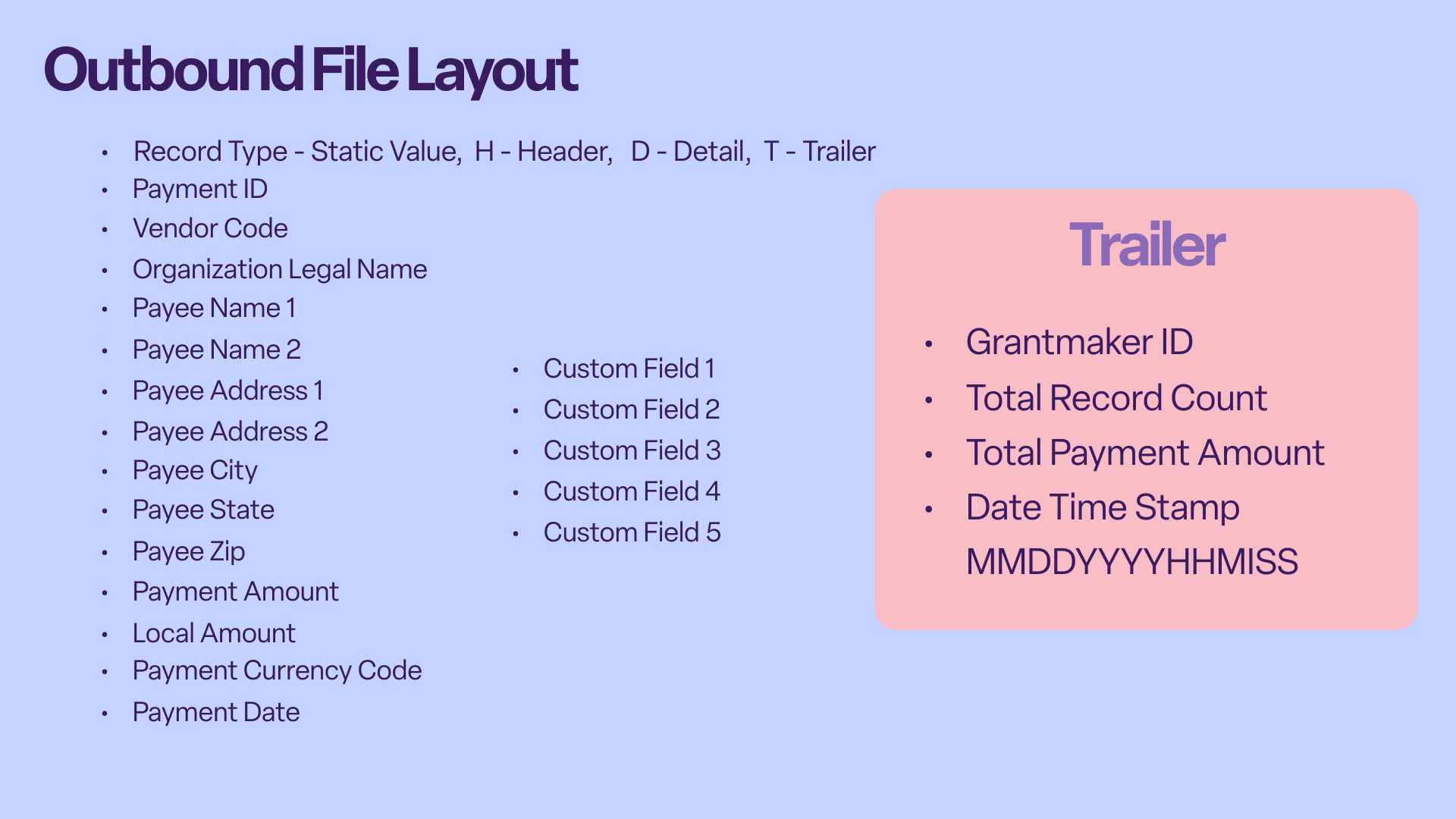
The outbound file sent from CyberGrants to your AP system contains comprehensive payment information:
- Record Types - Header (H), Detail (D), and Trailer (T) records
- Payment Identifiers - Payment ID and Vendor Code
- Payee Information - Organization legal name, address details
- Optional Information - Up to five custom fields for additional data
Inbound File Structure
The inbound file from your AP system to CyberGrants confirms payment processing with:
- Record Types - Header (H), Detail (D), and Trailer (T) records
- Payment Identifier - Payment ID to match with CyberGrants records
- Payment Confirmation - Check number, check date
- Payment Details - Amount paid and currency used
Workflow Options
The AP Feed Extension offers flexibility with two primary workflow options:
Workflow with Vendor Feed Extension
|
Workflow without Vendor Feed Extension
|
- Payments are scheduled in CyberGrants.
- A nightly job identifies all "Scheduled" payments.
- The system checks if a vendor code exists for each grantee.
- If no vendor code exists, the Vendor Feed process runs to obtain one.
- CyberGrants sends payment details to your AP system.
- Your AP system processes payments and returns confirmation data.
- CyberGrants updates payment records based on the returned data.
|
- Payments are scheduled in CyberGrants.
- A nightly job identifies all "Scheduled" payments.
- CyberGrants sends payment details directly to your AP system.
- Your AP system processes payments and returns confirmation data.
- CyberGrants updates payment records based on the returned data
|
System Requirements and Considerations
Payment Record Criteria
For a payment to be included in the outbound feed, it must meet these requirements:
- Belong to a specified proposal type
- Have an "Approved" disposition
- Be in a specified payment status
- Not previously transmitted to AP
- Have a payment amount greater than $0
- Have a payment date of the current date or earlier
- Have a vendor code assigned (if required)
Technical Specifications
- File Transfer - All files are transmitted via SFTP, not email
- File Format - Structured text files with header, detail, and trailer records
- Processing Frequency - Configurable based on your requirements
- Error Handling - System notifications for any processing errors
Multi-Currency Support
The AP Feed Extension can handle payments in multiple currencies:
- Payment amounts can be specified in both base currency and local currency.
- Currency codes (e.g., USD) are included in the data feed.
- Payments must be processed in either the specified currency or the account's base currency.
Implementation Methodology
Bonterra has developed a vetted methodology for implementing the AP Feed Extension. Adherence to this methodology is essential for:
- Ensuring expected system behavior
- Maintaining the ability to adopt new product features
- Preventing potential data loss
- Avoiding additional costs outside the initial project scope
Maintenance and Modifications
The AP Feed Extension includes a valuable maintenance package that provides ongoing support for the extension. To maintain system integrity while providing flexibility, Bonterra limits changes to:
- One modification per calendar year
- Changes that fall within the scope of the purchased extension
Any changes requested after implementation into the production environment may result in additional costs, particularly if they require alterations to the logic or structure of the data feed.
What else do you need help with?
Not what you're looking for? Navigate to AP Feed Extension Overview
Looking for training?
Explore this feature at your own pace - access training video content or watch a recorded webinar by clicking the link below.


