Rejecting gift records in bulk allows administrators to efficiently update gift status and ensure program integrity. Bulk dispositioning to reject is appropriate when a large group of gifts fails compliance or data validation checks.
Follow the instructions below to reject gift records in bulk.
Step 1: Access Bulk Disposition
- In the Production environment, navigate to the Admin tab.
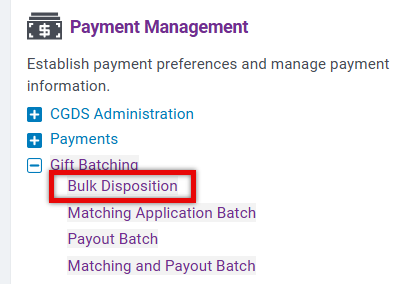
- Under Payment Management, select Bulk Disposition from the Gift Batching section.
Step 2: Filter Results
The following filters are available to define which records to include in your search:
- Donor Company
- Donor Employee Type
- Donor Role
- Gift Confirmation Date / Status
- Gift Creation Date
- Gift Date / Start Date
- Gift Discrepancy Status
- Gift Disposition
- Gift Fiscal Year
- Gift Owner
- Gift Program Type
- Gift Type
- Organization Country
- Total Organization Gift Amount
- Total Organization Match Amount
- Organization Disposition
- Organization Tax Status
- Organization Type
- ACH Eligible Payee
Only records that match your selected filters will appear in your results.
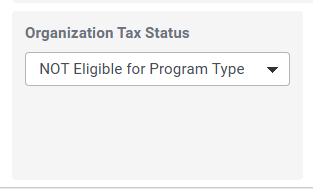
For example, selecting "NOT Eligible for Program Type" under "Organization Tax Status" will populate requests ineligible due to the organizational disposition. Non-matching records are automatically filtered out and excluded from summary totals.
Step 3: Set the Disposition Status to Reject
- Under the option labeled: "Change Gifts matching below criteria to this disposition:", choose Rejected from the dropdown.

Step 4: Run the Search
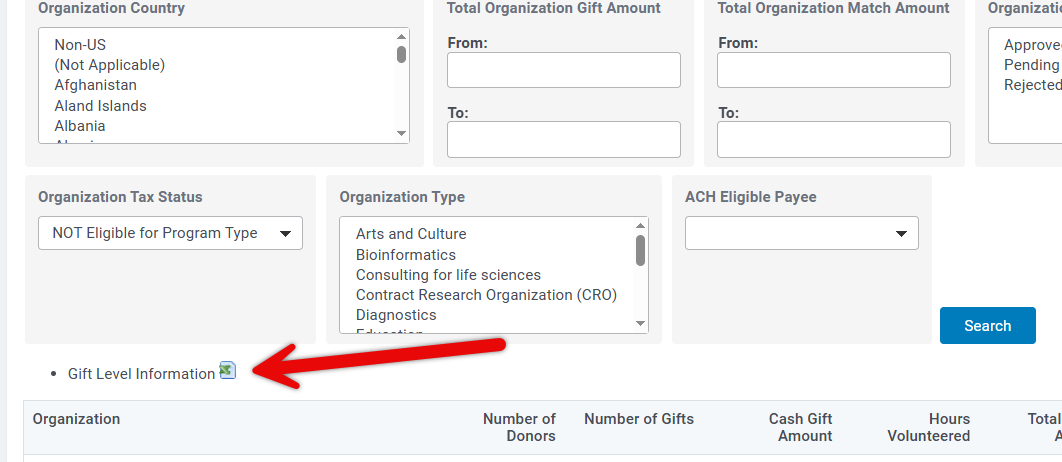
- Click Search to generate a list of gifts to reject.
- Results appear at the organizational level.
- Use the available CSV download link to export the results to Excel if desired.
- If your search returns more than 100 organizations, only the first 100 will display. You will be prompted to download the complete set of results using the CSV link.
Step 5: Review and apply the Rejection Disposition
- Review the records and, when prepared, click Reject Gifts.
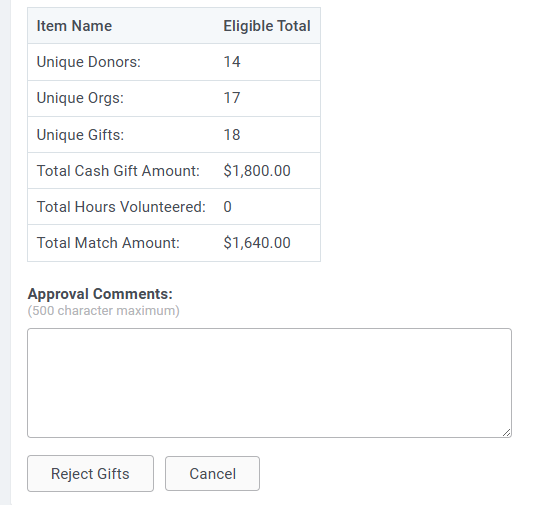
- The disposition status will be updated to Rejected for the affected gifts.
- This action will trigger email events if enabled.
- These gifts will be excluded from future processing or payment batches.
What else do you need help with?


