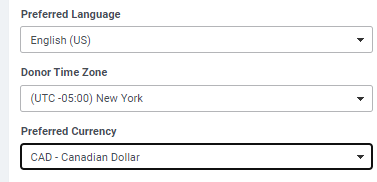
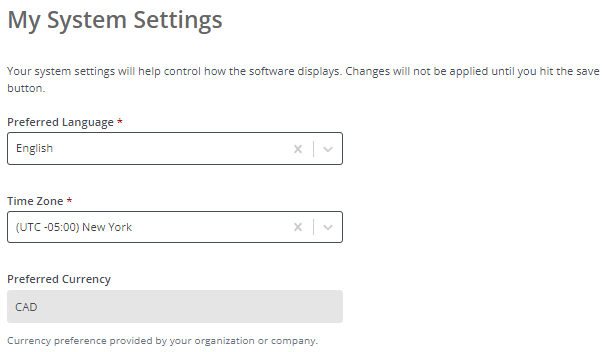
Donor-preferred currency is exposed as an internal field on the Donor Profile and as a read-only, pre-selected, standard FXC field within the EE Donor System Settings. The field results auto-populate for users when accessing the online application, where feasible based on product configuration.
Donors must contact an admin to adjust their preferred currency, however, while an admin may update the field value to change a donor's preferred currency, the HR feed populates the field and will ultimately override the input value. NOTE: Historical transactions reflect the currency in which the donation was given, regardless of any subsequent changes to the donor’s preferred currency.
Internal User View:
Donor View:
Donor giving defaults to the donor’s preferred currency unless otherwise defined by a proposal type’s settings. If a proposal type setting overrides the donor's preferred currency, the field will display the proposal type setting. Automated updates to the standard field follow the below sequence:
- Proposal Type setting
- Donor preferred
- GM Base - (Grantmaker/Program Base Currency)
If the exposed preferred currency field is null, the value will populate with your Grantmaker’s base currency.
What Areas are Excluded from this Feature?
Donor’s preferred currency will be pre-selected when giving in the standard FXC field, except in the following areas:
- Programs with existing proposal-type currency settings configured. These take priority over donor preference.
- Donor-preferred currency cannot be used when:
- The Grantmaker base currency is not USD.
- Giving by credit card (unless enabled for international giving via CAF America).
- When a Grantmaker has CGDS enabled (unless enabled for international giving via CAF America).
- When giving to an organization in Canada, the gift must be made in CAD.
- Dollars for Doers portlets are unconnected from this feature and will remain unchanged from the current experience.
- Match balance results are displayed on the donor application website in your program’s base currency.
Donor Recommended FAQ:
We, highly, recommend that the below FAQ be added to instruct donors on how to update their preferred currency. Below is a sample copy:
Q: How can I update my preferred currency?
- A: Preferred currency can be updated by a System Administrator. Please contact a system administrator to request an update to your preferred currency in the HR feed. After your currency has been updated, the change will be reflected in your System Settings and, when possible, your preferred currency will be pre-selected when giving.
What else do you need help with?


