The CyberGrants Charitable Spending Account (CSA) Extension is a standardized add-on that enables program administrators to allocate charitable funds to employees for donation to eligible nonprofits.
This pre-configured extension provides a structured way to grant spending power to employees while tracking balances and usage against program-specific criteria.
The CSA Extension empowers employees to give to causes they care about while reinforcing your company’s commitment to social impact. Benefits include:
- Streamlined fund allocation and redemption processes
- Enhanced donor engagement
- Simplified program oversight
- Standardized setup ensuring ongoing compatibility and maintenance
Core Functionality
At its core, the CSA Extension enables program administrators to:
- Allocate charitable funds to employees (donors).
- Allow employees to redeem funds through a controlled Proposal Type.
- Track and manage allocation limits, redemption transactions, and program balances.
Key Components
CSA Allocation (via Feed or Portlet):
|
Feed - A one-way file upload process via secure FTP. The file is processed nightly to allocate funds to employees.
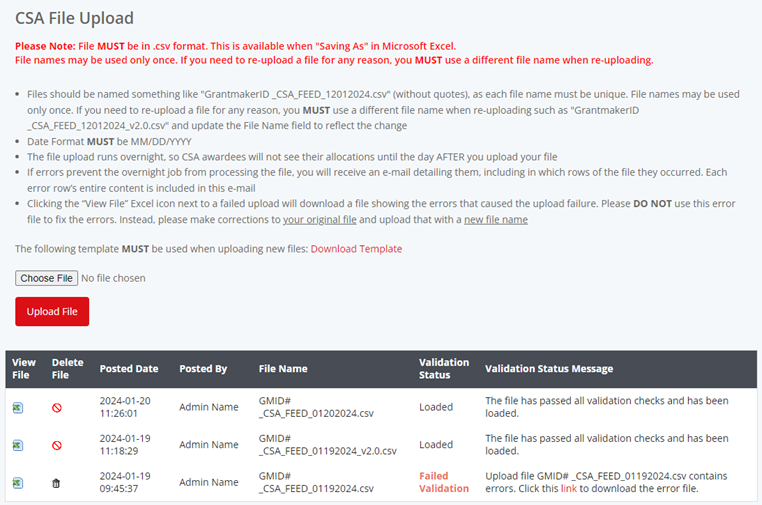
Portlet - An internal dashboard interface for CyberGrants Admins to manually upload donor allocation files.
|
|
|
Determines donor eligibility by calculating their remaining balance.
|
|
|
Ensures gift redemptions meet minimum thresholds and adjusts redemptions if they exceed remaining balances.
|
|
|
Logic that reduces allocation balances upon redemption and auto-adjusts amounts to fit program limits.
|
|
|
Displays current balance, total allocated, redeemed amounts, and transaction history to logged-in employees.

|
Workflow Example
- Allocating Funds:
- Admin uploads a file (via Feed or Portlet) with key donor allocation information.
- The file includes:
- Donor ID
- CSA Amount
- Currency (optional)
- Fiscal Year
- Proposal Type ID
- Donor Access Control:
- The Donor Criteria checks if the donor has a remaining balance greater than $0.
- If eligible, the donor can access the CSA Proposal Type.
- Submitting a Gift:
- The donor enters a gift request.
- If the gift meets the criteria and doesn’t exceed their balance, it is processed.
- If the requested amount exceeds the balance, the Redemption function adjusts the amount.
- Tracking Balances:
- Donors view their CSA Program Name, number of redemptions, total awarded, redeemed, and remaining balances via the Balance Portlet.
Technical Specifications
- Inbound File Format - CSV with 5 required fields
- Currencies - Defaults to client’s base currency if unspecified
- Execution Schedule - Nightly job for SFTP feeds
- Visibility - Admin-managed Portlets and Donor-facing Portlets
What else do you need help with?


