Use the D4D Eligibility Notification (ID 20143) email reminder to increase participation in your Dollars for Doers programs by keeping employees informed about their eligibility to redeem a Dollars for Doers volunteer match. Dollars for Doers reminder emails are sent to employees when they become eligible to redeem a Dollars for Doers volunteer match and can be configured to continue sending at a regular frequency until they are no longer eligible.
To set specifications and configure a D4D Eligibility Notification (ID 20143) email reminder, please proceed through the following steps:
Step 1: Go to the Admin Tab
While in the CyberGrants Sandbox environment, navigate to the Admin tab.
Step 2: Go to Reminders
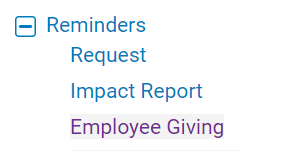
On the Admin tab, navigate to the E-Mail Configuration section. Then, below "Reminders", click the Employee Giving hyperlink.
Step 3: Click Edit next to an Email Reminder
To edit Default settings, click the Edit button corresponding to the appropriate email reminder name [D4D Eligibility Notification (ID 20143)] in the Available E-mail Events table.
-
Note: The D4D Eligibility Notification will not be active unless the "Active?" checkbox is selected. Emails are generated in a nightly batch job and will not be sent as soon as they are made active. Then, they will send to employees as they become eligible for a volunteer match.
Step 4: Schedule the Email Reminder
Set the email delivery frequency in Send reminder e-mail when the number of days after hours were logged affiliated with D4D reaches: field contains at least one frequency.
-
Note: The minimum frequency is 1.

Step 5: Apply current email event settings
In the Apply the current email event settings field choose (Default) to apply the same settings across all Dollars for Doers Log Hours programs or choose the specific Dollars for Doers Log Hours program. Then, save and publish the update.

Step 6: Employee receives an email outlining the next steps
Once an employee has enough eligible logged hours in the Donor portal, they will receive an email to the address associated with their account notifying them of their eligibility for a volunteer match. A reminder will be sent to them until the last configured frequency passes or they become ineligible. Employees will need to access the Donor portal to redeem their match.
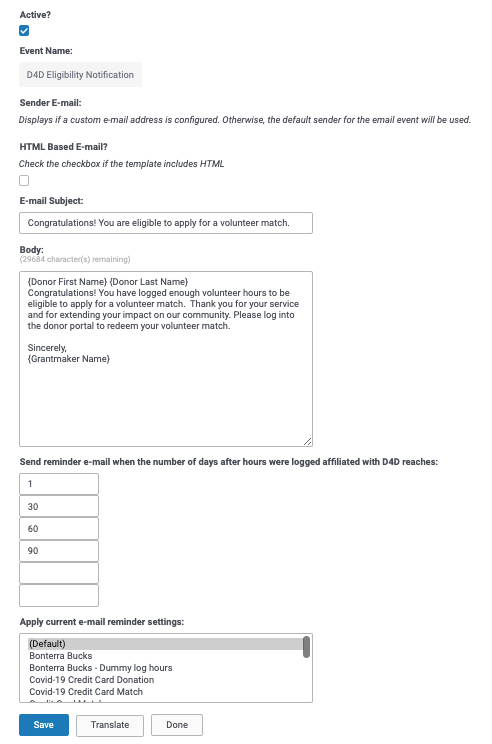
Figure 1 D4D Eligibility Notification Email Reminder Settings
Email Content
You can use the following for the reminder's content:
Subject:
Congratulations! You are eligible to apply for a volunteer match.
Body:
{Donor First Name} {Donor Last Name}
Congratulations! You have logged enough volunteer hours to be eligible to apply for a volunteer match. Thank you for your service and for extending your impact on our community. Please log into the donor portal to redeem your volunteer match.
Sincerely,
{Grantmaker Name}
What else do you need help with?
Not what you're looking for? Navigate to Understanding Email Event and Email Reminder Configuration


