Insights users can view the total Insights licenses available, including the number of Analyst and Viewer licenses, as well as the assigned and remaining licenses for each type through the Insights self-service user management tool. If additional licenses are needed, administrators can contact their support or sales representative to purchase more.
Please proceed as follows to view your Insights License Information.
Step 1: Access the Insights Tab
Admin users with Insights permissions can navigate to the Insights tab within the platform.
Step 2: Locate the Users Section
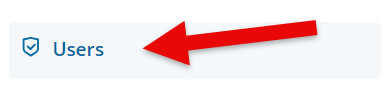
Click on the Users link located in the left-side panel.
Step 3: View Insights License Information
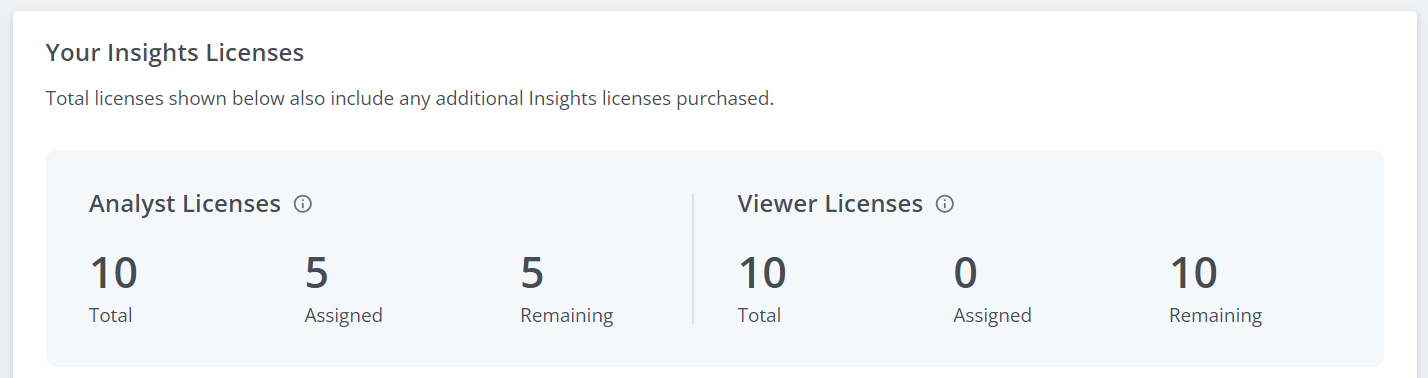
The Users page will display the total Insights licenses available for the program, including any additional licenses that have been purchased. This information will be broken down between Analyst Licenses and Viewer Licenses and will display the following details:
- Total: The total number of licenses available for each license type (Analyst and Viewer).
- Assigned: The total number of licenses that have been assigned for each license type.
- Remaining: The total number of licenses remaining and available to be assigned to new users for each license type.
What else do you need help with?
Not what you're looking for? Navigate to Understanding the Insights Self-Service User Management Portal


