Insights Donor Team Fields Overview
Ingishts Donor Team fields within an Explore can be a valuable tool used to gather data specific to a donor team’s goal progress, allowing Analysts to track and visualize efforts made towards focused and overall performance across all teams. Insights Analysts can leverage these fields to gain a deeper understanding of their program's team participation efforts, enabling them to make informed decisions based on their program's activity.
- Donor Team fields can be added when generating a report using any Explore with access to donor information.
- These data fields include dimensions such as Team Name, Team Reference Code, and Team Percent Participation Goal, as well as measures like Team Annual Donation Goal and Team Annual Hour Goal.
Feature Availability:
Insights Explores are accessible only to Insights Analysts. Administrators can manage Insights permissions for their program's internal users through the Users section in the Insights platform. Click Here to learn more about the Insights Self-Service User Management Portal.
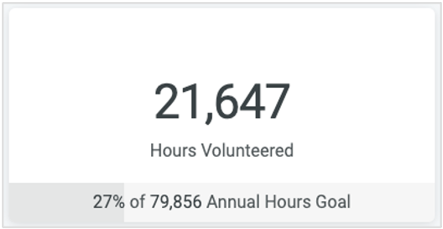 | 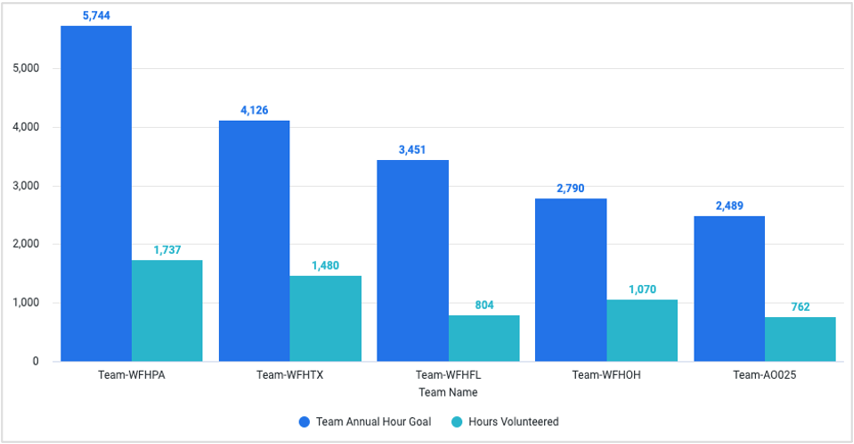 |
| Figure 1 Hours Volunteered compared to Annual Goal as a percentage | Figure 2 Hours Volunteered compared to Annual Goal as a bar graph |
To better understand Insights Donor Team fields and how to utilize them, please view the articles below.
What do you need help with?
Additional Resources
Not what you're looking for? Navigate to Insights Analyze Advanced Overview


