Users can move between the CyberGrants Sandbox and Production environments by clicking a link in the top right corner of the screen or by navigating directly to the appropriate URL. Administrators must first grant users the appropriate permissions to view and work within the isolated Sandbox space.
Sandbox provides a safe, isolated space where users can edit and reconfigure programs, fields, emails, and other system elements without impacting the real data in Production. It's commonly used for training, testing, and experimenting with changes before promoting them to the live environment. It's important to note that access to Sandbox is not granted by default.
Administrators must explicitly provide users with the appropriate permissions to view and work within Sandbox. If a user does not see the "Access Sandbox" link, an Administrator will need to grant them access. Additionally, users accessing Sandbox will have the same security level and permissions they have in the Production environment. Single Sign-On (SSO) users may need to log in to Production first before being able to access Sandbox.
Check out this video that guides you through navigating between the Sandbox and Production environments.
Step 1: Access Sandbox
Authorized users can access the Sandbox environment by clicking the "Access Sandbox" link in the upper right-hand corner of the screen when logged into the CyberGrants system. Alternatively, users can directly access Sandbox by navigating to https://sandbox.cybergrants.com/login-sb/CGLogin and logging in with their regular user credentials.

Once in Sandbox, users will notice a distinct visual indicator - a rainbow gradient stripe above the gray menu bar at the top of the page. This signifies that the user is currently working within Sandbox, rather than the live Production environment.

Step 2: Access Production
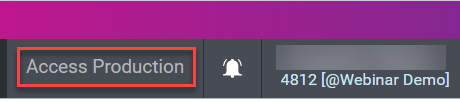
When logged into the Sandbox environment, authorized users can access the Production environment by clicking the "Access Production" link in the upper right-hand corner of the screen. Alternatively, users can directly access the CyberGrants production environment (https://www.cybergrants.com/login-sb/CGLogin) using their regular user credentials.
What else do you need help with?
Not what you're looking for? Navigate to Understanding CyberGrants Sandbox and Production Environment


