All client configuration changes must be made in the Sandbox environment. Authorized administrators can access Sandbox using their regular user ID and password or via Single Sign-On if enabled. There is a significant visual difference between the two environments to help users identify when they are working in Sandbox.

Other than requiring administrators to make all configuration changes in Sandbox, the manner in which one makes these alterations to items such as fields, proposal types, styles, etc. remains the same.
Step 1: Access the Sandbox environment
Log in to the production Admin Tab. Click on the "Access Sandbox" link in the upper right-hand corner of the screen.
Alternatively, you can access the Sandbox directly via the following link: https://sandbox.cybergrants.com/login-sb/CGLogin and log in using your regular user ID and password. Users with Single Sign-On (SSO) enabled will need to log in to the Production environment first and then click the "Access Sandbox" link to access the Sandbox, as they cannot directly access the Sandbox via the provided URL.

Step 2: Make a configuration change in Sandbox
Authorized Administrators can make changes to fields, proposal types, styles, and other account configurations in the Sandbox environment. Refer to the CyberGrants User Manual in the Help area or contact the CyberGrants Client Manager for assistance or clarification on making account configuration edits.
Step 3: Save configuration changes
Save the changes you have made.
Step 4: Publish Configuration Changes in Sandbox
All client configuration changes must be published before they will become active in the production account. Changes can be published individually or in bulk.
Publishing Individual Changes
When saving a change to a configuration element, users who are authorized to publish changes will see a notification message prompting them to publish the change. It is essential to keep in mind that certain dependencies require related items to be published simultaneously.
For example, publishing changes to an individual Proposal Type will also bring along changes made to items such as custom fields and email events contained in that proposal type. Please refer to Appendix B of the Replication Scenario Glossary.

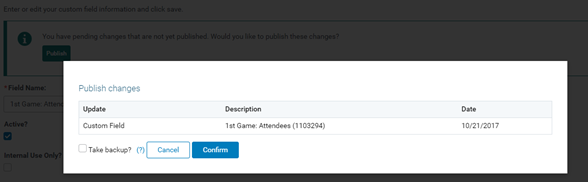
- Click “Publish” to show the type of change, a high-level description of the change, and the date of the change, if applicable.
- Click “Confirm” to publish the item
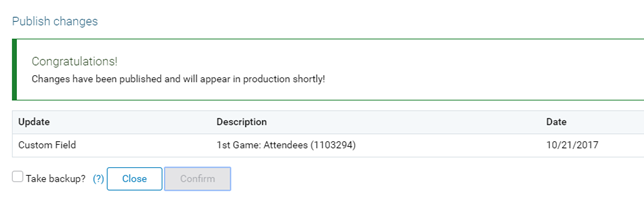
A success message appears when the publication is queued.
Publishing Bulk Changes
Authorized users can publish all outstanding changes via Bulk Publishing. Please keep in mind that all outstanding changes, including those related to approval and request mapping workflow, those pending for other functional groups within the account, and those that may be still undergoing User Acceptance Testing (UAT) will be published. Consult internal colleagues and/or the CyberGrants Client Manager to ensure that the appropriate changes are published. To access:
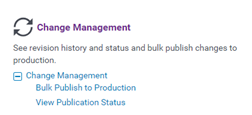
- Click “Bulk Publish to Production” under Change Management on the Admin Tab. If this option is not visible, contact the internal administrator or CyberGrants Client Manager to grant permission to Bulk Publishing.
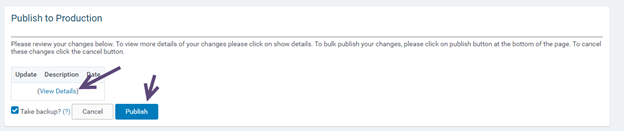
- A list of all unpublished changes, including change dates and record counts appears after clicking “View Details." Click “Publish”, as in the case of Individual Publishing. Changes will be queued for publication.
Step 5: View the Publication Status
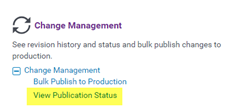
Most changes are published to the production environment in near real-time. However, it's important to note that there may be a brief period before these published changes become fully active. To monitor the status of published items, administrators can click the "View Publication Status" link under the Change Management section of the Admin Tab.
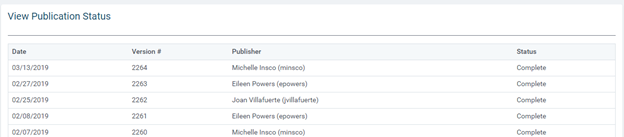
This publication status page provides an audit trail that includes the date, version number, publisher's name, and user ID, as well as the current publication status. Items listed as "Complete" have been successfully published to the production environment, while those listed as "Pending" are currently in the process of being published.
What else do you need help with?
Not what you're looking for? Navigate to Understanding CyberGrants Sandbox and Production Environments


