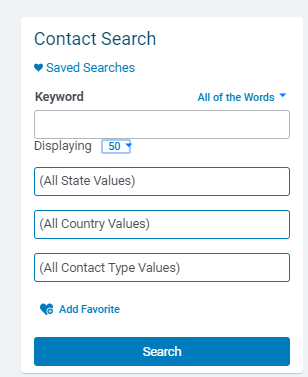
The Contact Search feature allows you to search for contacts based on various criteria. You can enter a keyword, such as a contact name, organization name, organization street address, or organization city, and select the appropriate condition for your search. Additionally, you can choose the number of rows to display on the screen and use various filters to narrow down your search results.
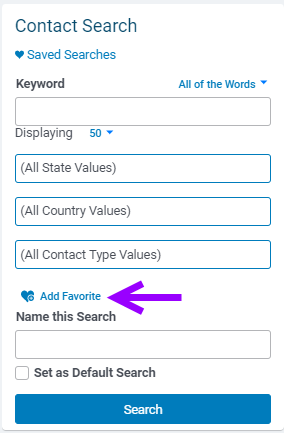
Once you have set up your desired search criteria, you have the option to save the search as a Favorite. This allows you to easily access and run the same search in the future. You can also set a Favorite search as your default search. If you no longer need a Favorite search, you can delete it from the system.
Step 1: Enter the Mail tab
Navigate to the Mail tab in CyberGrants.
Step 2: Enter a Keyword
Enter a keyword in the search field (e.g., a contact name, organization name, organization street address, or organization city).
Step 3: Select Search Condition
Select the appropriate condition:
- "All of the words"
- "Any of the words"
- "Exact phrase"
Step 4: Identify the Number of Rows
Select the number of rows to display on the screen:
Step 5: Use Search Filters
To narrow your contact search, use the following filters:
Step 6: Create a Favorite Search
Select your search criteria and enter a name in the "Name this Search" textbox to save your search. Then, click the "Search" button.
Note: Check the "Set as Default Search" checkbox to set this search as your default search.
Step 7: Delete a Favorite Search
Select your favorite search from the "Saved Searches" field and check the "Delete Search" checkbox. Then, click the "Search" button.
What else do you need help with?
Not what you're looking for? Navigate to Understanding Mail Activity


