What Are Organization Profiles?
The Employee Engagement - Organization Profile enables employees to learn more about organizations that they haven't engaged with in the past so that they can confidently identify whether they want to support that organization.
- Employees can find more information about organizations by linking to the Organization Profile from existing portlets and search results
- Employees can continue their previous activities without needing to access the Organization Profile; the Organization Profile pops up over what they were doing before
Table of Contents
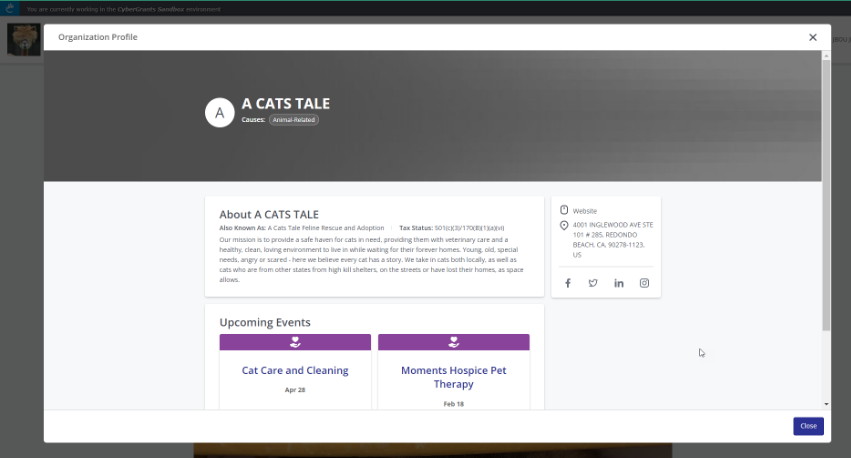
Example Organization Profile
Where can employees see the Organization Profile?
Employees can optionally view the Organization Profile when they are:
- Searching for events
- Searching for organizations when donating
- Looking at the My Recent Organizations portlet
- Viewing Featured Events or Recommended Events portlets
What information is available on the Org Profile?
- Organization information:
- Legal name
- "Also known as" Name
- Logo
- If no logo is provided, the Organization Profile will display the first letter of the organization's name
- Causes
- Year founded
- Tax status
- Organization mission statement
- If no mission statement is provided, the employee will view a message saying that the organization has not provided a mission statement
- Website
- Social media links (Twitter, Facebook, LinkedIn, Instagram)
- Upcoming events
- Employees will have options to donate to the organization if they are eligible for a selected proposal type
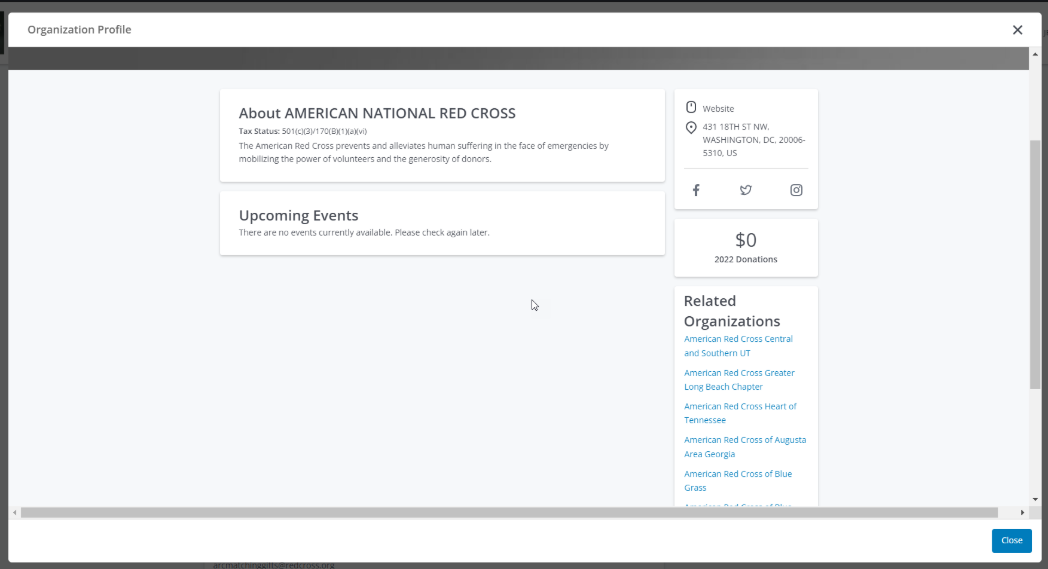
- Employees can see Related Organizations of organization they are looking at on the Organization Profile
- Related Organizations will show the parent or children of the organization being viewed
- Employees may click to view the Organization Profile for the related organization
- If there are more than 10 child organizations, the employee will see "and more" at the end of the list
- The child organizations will be listed in alphabetical order
View related organizations in Organization Profile
Where is the information in the Org Profile coming from?
Org Profile information can come from FrontDoor, from the grantmaker org record, or from tax files if the organization doesn't exist in the grantmaker today.
| Org source | Grantmaker status | Non-FrontDoor-Enabled Grantmaker | FrontDoor-Enabled Grantmaker |
| Tax file imports | Tax file (e.g. IRS Business Master File, NCES Database, Canada Revenue Agency File) | Tax file (e.g. IRS Business Master File, NCES Database, Canada Revenue Agency File) |
| Non-FrontDoor Org | Grantmaker organization record | Grantmaker organization record |
| FrontDoor Org | Grantmaker organization record | Client FrontDoor organization record |
Clients using FrontDoor will provide their employees with a richer experience on the Org Profile. If you aren't using FrontDoor yet, check out more information below!
How do donation options appear on the Org Profile?
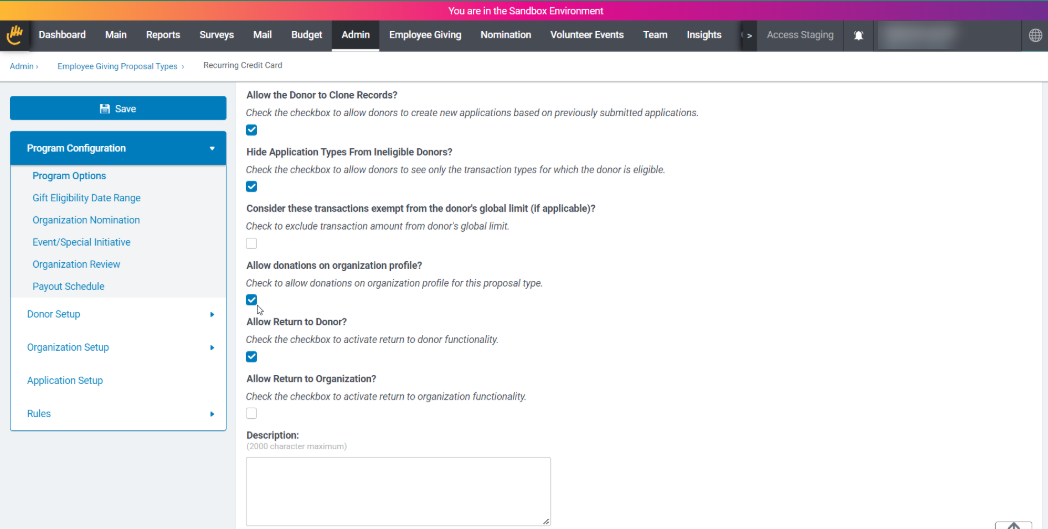
Administrators can choose whether their employees can donate from the Organization Profile by choosing which donation proposal types should be available to employees. This feature is designed to enable employees to understand additional options they have to participate with organizations they may not have worked with in the past.
This can be done in two places:
- When setting up multiple proposal types at the same time
- When creating or editing an individual proposal type
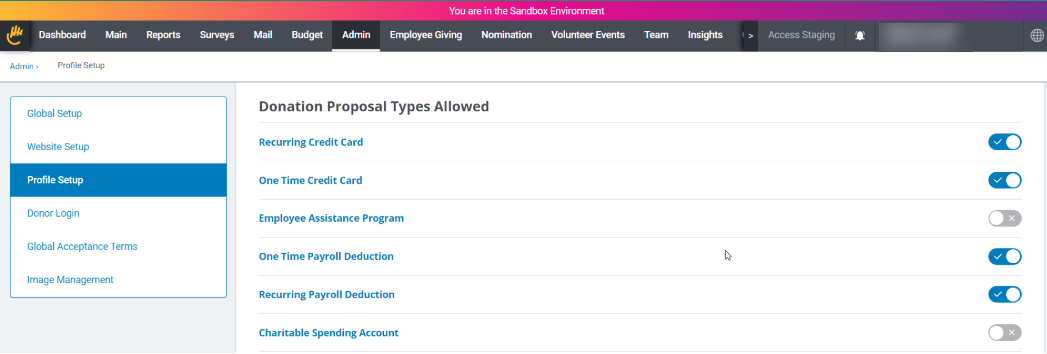
Configuring multiple donation proposal types in Admin > General Application Configuration > Profile Setup
Configuring an individual donation proposal type
How does the Profile Setup configuration page work?
- Employee Engagement proposal types (eg_request and eg_deduction_summary) that have a transaction unit of Dollars AND that have been selected as including a "Donor Module Component" will appear within the configuration page
- Client admins can select whether the displayed proposal type should be available to eligible employees within the Org Profile Donate button
- Note: If the proposal type is only applicable to an individual organization or a sub-set of organizations but is not using eligibility calculations (e.g. Region, NTEE code, tax status), it should not be selected in the Profile Setup configuration
- Note: Even if the proposal type is selected within the Org Profile configuration, if the employee and the organization being viewed are not selectable for the proposal type, it will not appear under the Donate button
- Note: This means if you use ANY restrictions on PORTAL PAGES or PORTLETS like Allowable Donor Role, Allowable Employee Type, Allowable Company, Allowable Donor State, Allowable Donor Country in lieu of using Donor Rules to control donor access to the proposal type, you should never enable the PT in the Donate button functionality.
- Client admins may click to view the details of the proposal types displayed within the Profile Setup configuration
How do I publish my selections?
- Proposal type settings may only be edited in Sandbox but may be viewed within the Production environment
- When publishing Org Profile settings from Sandbox to Production, only the selection of whether the proposal type should show will be published
How do proposal types show in the Org Profile?
Viewing available proposal types as an employee within Org Profile
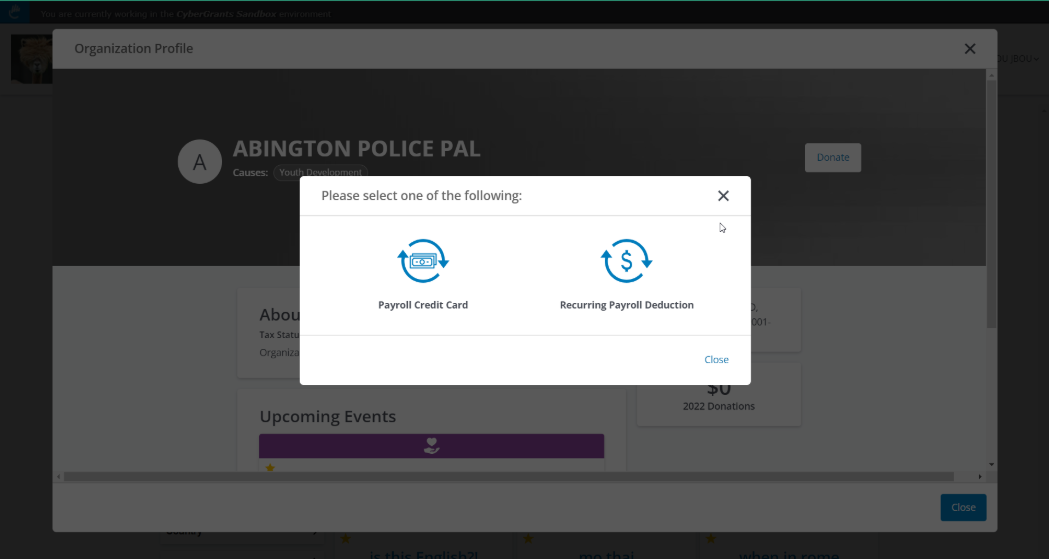
- If the employee is eligible for any of the proposal types selected to display within the Org Profile, the Donate button may appear in the Org Profile
- Under the Donate button, the employee will only see the proposal type options that are:
- selected to display in the Org Profile
- AND eligible for them as employees
- AND selectable for the organization they are viewing
- Note: If the organization can be nominated but is not selectable for the proposal type, the proposal type will not appear
- If the employee is not eligible for the proposal type and the organization being viewed is not selectable for any of the proposal types chosen in Profile Setup, the Donate button will not appear to the employee
What can you do with the Org Profile?
What can Employees do with the Org Profile?
- Sign up for upcoming events
- If the client has at least one active volunteer event proposal type AND the organization the employee is looking at has an open event in the Grantmaker AND the employee is eligible for the event, the employee will see up to 12 upcoming events
- If there are no open events for the organization in the Grantmaker, the Upcoming Events section will display a message saying there are no open events
- Upcoming events will be ordered by the most recent to furthest away
- If the employee selects to Sign Up for an upcoming event, their page will refresh and direct to the Sign Up page selection
- Donate to the organization
- If the employee is eligible for any of the selected proposal types for the Org Profile AND the organization they are viewing is also selectable for that proposal type, the Donate button will appear within the Org Profile
- If there is only one eligible proposal type, the employee will go directly to that proposal type's donation workflow
- View content in multiple languages
- Standard labels within the organization profile will be translated to CyberGrants' supported languages
- Content from the organization record or the event record will remain in the language it was provided in; it will not be automatically translated
What can Administrators do with the Org Profile?
- At this time, the Org Profile display is the same across all grantmakers
- However, the information shown in the Org Profile can be updated as follows:
- If the organization being viewed is a FrontDoor organization, the information can be updated in FrontDoor
- If the organization being viewed is a grantmaker-specific record, that information may be updated in the organization portal, assuming that the fields are available to the organization within the portal
- As new features are added to the Org Profile, additional controls will be added for administrators to choose whether certain features will be visible
Frequently Asked Questions
- How does the organization profile display to Community users?
- Community members will only see upcoming events if they are eligible for the proposal type and the Community flag on the event is set to "Yes"
- What happens if an employee selects an upcoming event they are not eligible for?
- The employee will only see an event in upcoming events if they are eligible for at least one of the proposal types associated with the event's proposal type; if they try to sign up using a proposal type for which they are not eligible, they will see an error
- Can I change the number of the events displayed on the Upcoming Events section?
- The Upcoming Events section can display up to 12 events
Where can I learn more about the Org Profile?
- Watch this video to learn more about the Org Profile and other related features!
Related materials


