The Southern Poverty Law Center (SPLC) maintains a database of organizations identified as domestic hate groups. The SPLC filter within the CyberGrants platform allows users to prevent any form of engagement, including grants, donations, and matching funds, with these designated hate groups.
- Click here to learn more about the Southern Poverty Law Center (SPLC) Filter in CyberGrants.
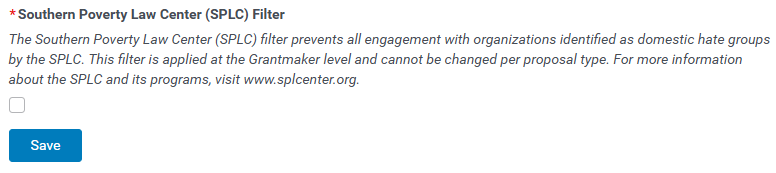
To help ensure your philanthropic activities align with this mission, activate the Southern Poverty Law Center (SPLC) filter for Organization Searches by following the steps below:
Step 1: Access the Admin tab in Sandbox
Enter CyberGrants and access Sandbox. While in the Sandbox environment, navigate to the Admin tab.

Step 2: View Primary Info
On the Admin tab, view the General Settings section and click the Primary Info hyperlink.
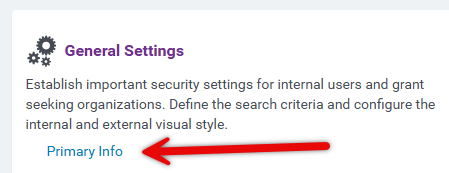
Step 3: Select SPLC Filter
At the bottom of the page, select the Southern Poverty Law Center (SPLC) Filter checkbox. The SPLC filter has been activated and will be applied to all Organization Searches.
Note: The filter only prevents new submissions to organizations on the SPLC list. Existing active gifts, including recurring payroll deductions, credit card donations, and corresponding matches, will continue to be processed even if an organization is later added to the SPLC list.
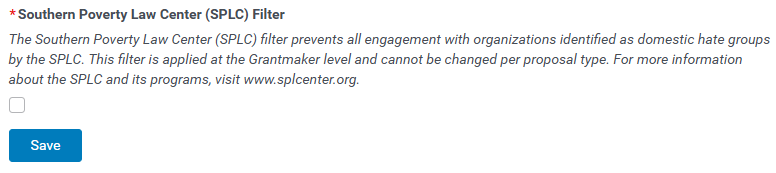
Step 4: Save and Publish
Click Save, then Publish to migrate your changes to Production and make them visible to users.
What else do you need help with?
Additional Resources
Not what you're looking for? Navigate to Understanding Application Configuration


