Inbound email processing capability enables clients to easily maintain complete historical records of all email correspondence with their grantees as they collaborate and share details relevant to the request. This not only enhances transparency and accountability but also saves time and effort by eliminating the need for manual tracking and sharing of email threads.
Please keep in mind the following key points related to this functionality:
- To ensure the security and integrity of your email communications, CyberGrants employs several safeguards during the import process. Prior to being added to the system, each email is scanned for potential spam or malware, and any flagged messages will not be imported.
- The import process runs on a 5-minute interval, so there may be a short delay before new emails appear in the associated records.
- Emails up to 30 MBs will be processed and imported into CyberGrants. This includes the email content and all attachments combined.
- Most standard file types are supported as attachments.
See below for additional information on the inbound email processing functionality from assigning unique email addresses to accessing logged emails and outgoing communications.
Unique Email Address Assignment:
When enabled by the client management team, each Organization record and Request record will be assigned a unique email address.
- When an email is sent to this address (as either a direct recipient or as a CC), the email and any attachments will be logged against the associated record in CyberGrants.
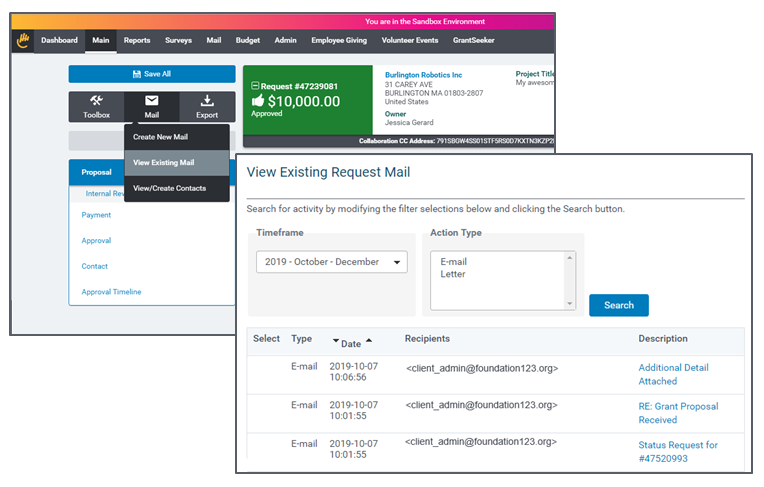
- The Collaboration email address will be displayed just below the summary pane.

Accessing Logged Emails:
For consistency, the logged emails are found in the Existing Mail view under the associated Organization or Request record.
- To help streamline the process of finding email records, the current quarter is set as the default timeframe, and the search is automatically performed upon opening the page.
Outgoing Email Events:
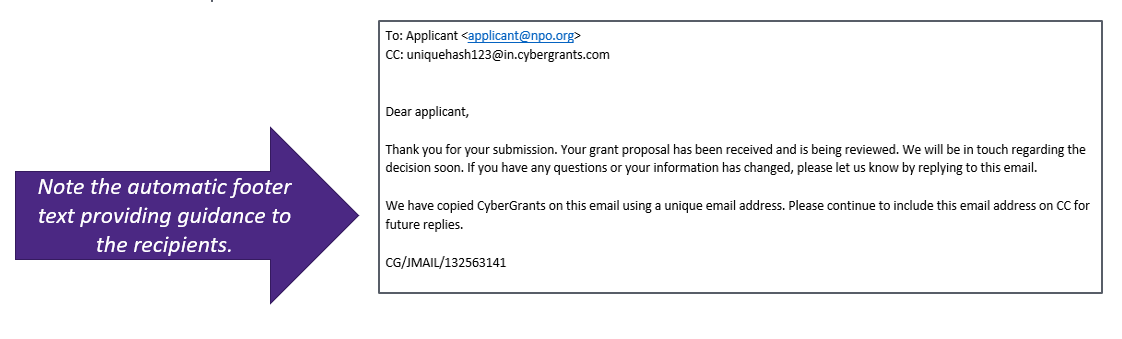
To fully remove the manual efforts to share the email record with CyberGrants, all outgoing request-specific email events automatically include the Collaboration email address on CC.
Email Event Recipient Notification:
To avoid confusion for the email event recipients, the text template has been modified to include footer text explaining the Collaboration email address.
- This footer text is automatically appended to the end of the text-based template.
- For clients using HTML-based templates, a standard merge field exists to insert the default text in the appropriate location.
Troubleshooting:
Not finding an email you expected to be there? It may have been flagged and not imported due to one of the above rules. If it is a valid email, please work with your client management team so we can review it further.
What else do you need help with?
Not what you're looking for? Navigate to Understanding Email Communication Management


