Insights (Looker) provides a set of basic date filter parameters that allow users to easily filter data based on various time periods. These parameters provide users with the ability to further analyze the data displayed in Insights by focusing on the most relevant information.
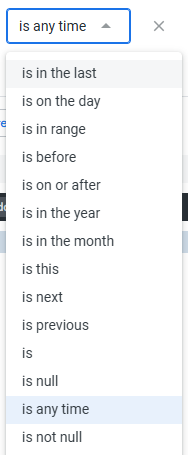
Proceed as follows to explore the basic date filter parameters and their definitions.
Step 1: Access the Insights tab
Log in to the CyberGrants platform and navigate to the Insights tab.

Step 2: Understand Date Filter Options
View the below chart to gain a better understanding of the basic date filter options available in Insights, such as "Last 30 Days," "This Month," and others.
Date Parameter
|
Definition
|
Example
|
| is in the last | current time period and the previous number of time periods minus the current time period |
- is in the last 7 days means the current day and the previous six days.
- is in the last 7 complete days means the previous 7 days, excluding the current date.
- is in the last 1 week means the current week.
- is in the last 1 complete week means the previous week, excluding the current week.
- is in the last 6 months refers to the current month and the previous five months.
- is in the last 6 complete months refers to the previous 6 months, excluding the current month.
|
| is on the day | on a specific date |
- is on the day 8/27/24 = data on 8/27/24
|
| is in the range | specific date range up to (not including) a specified end date |
- in the range 1/1/24 - 3/30/24 = Jan 1, 2024 up through Mar 29, 2024
|
| is before | time period up to (not including) a specified date |
- is before 8/28/24 = all time up to and including 8/27/24
|
| is on or after | time period on a specified date or after a specified date |
- is on or after 8/16/24 = includes 8/16/24 and beyond
|
| is in the year | time period within a specified year |
- is in the year 2024 = data from 1/1/24 through 12/31/24
- is in the year 2023 = data from 1/1/23 through 12/31/23
|
| is in the month | time period within a specified month and year specified |
- is in the month August 2024 = data from 8/1/24 through 8/31/24
- is in the month July 2024 = data from 7/1/24 through 7/31/24
|
| is this | time period within the day, week, month, quarter, year |
- is this day = current day
- is this week = current week
- is this month = current month
- is this quarter = current quarter
- is this year = current year
|
| is next | time period of the next day, week, month, quarter, year |
- is next day = tomorrow
- is next week = next week
- is next month = next month
- is next quarter = next quarter
- is next year = next year
|
| is previous | time period of the previous day, week, month, quarter, year |
- is previous day = yesterday
- is previous week = last week
- is previous month = last month
- is previous quarter = last quarter
- is previous year = last year
|
| is | time period specified |
- is one month ago for 2 months = current month plus last month (July/August to current day - if today is August)
- is two months ago for 1 month = June (if today is August)
|
| is null | date is null |
- is tied to records without a date recorded
|
| is any time | no time period specified |
- is tied to records a date recorded without any specific time period
|
| is not null | date is not null |
- is tied to records with a date recorded
|
What else do you need help with?
Not what you're looking for? Navigate to Understanding Insights Reports


