The Donor Explore equips administrators with comprehensive insights into program donor data, encompassing details related to employee giving, programs, and donor types.
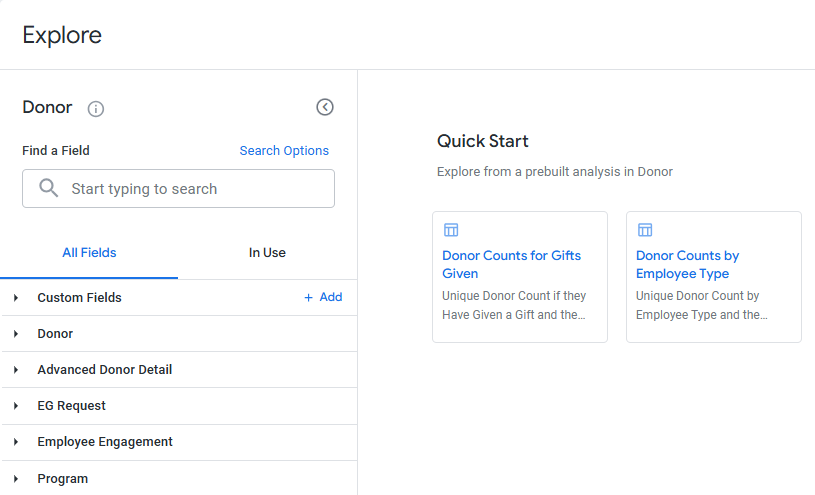
Proceed through the steps outlined below to access the Insights Donor Explore and view its available data fields.
Step 1: Access the Insights tab
Log in to the CyberGrants platform and navigate to the Insights tab.

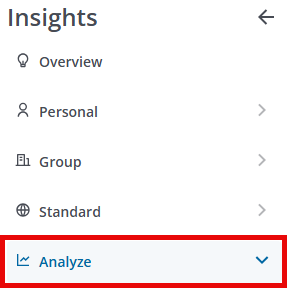
Step 2: Click on Analyze
From the left-hand menu, Insights Analysts can click on Analyze to view the available Explores.
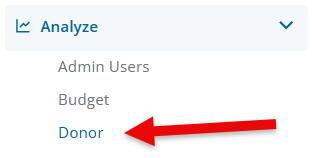
Step 3: Select the Donor Explore
Click on Donor to view the Explore.
Step 4: Access the Quick Start Reports
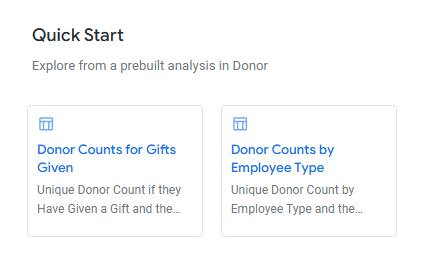
Before starting fresh by creating a new data set using the fields available within the Explore, review the Quick Start reports listed to determine if these prebuilt analyses will pull the program data you are seeking. The Donor Explore includes the following Quick Start analyses:
- Donor Counts for Gifts Given - A unique donor count, considering only those who have given a gift, and the average gift amount.
- Donor Counts by Employee Type - A unique donor count broken down by employee type, along with the average gift amount.
Step 5: View the Field Dimensions & Measures
Below are the fields available within the Donor Explore along with their dimensions and measures.
Field Name
|
Filter-Only Fields
|
Dimensions
|
Measures
|
| Donor | N/A |
- Annual Hours Volunteered Goal per Donor
- Company
- Dates
- Department
- Does Donor Have a Request?
- Donor Code
- Donor ID
- Donor Team
- Email Address
- Employee Type
- Flags
- geocode_history
- Location
- Location: Geocode
- Name
- Pay Cycle
- Role Name
- Tenure
|
|
| Advanced Donor Detail | N/A |
- Age Demographics
- Amounts per Donor
- Dates
- Days Since
- Donation Types
- Donor Retention Type
- Flags
- Gift Count Tier
- Gift Size Tier
|
- Amounts per Donor
- Days Since
- Organization Count per Donor
- Totals
|
| EG Request | N/A |
- Amounts
- Approval Comments
- Dates
- Description
- Designation
- Disposition
- EG Fiscal Year
- Flags
- IDs
- Is Recurring?
- Recognition
- Reference Code
- Wallet Type
|
- Averages
- Counts
- Medians
- Totals
|
| Employee Engagement |
- Hours to Dollars
- Projected Pledge End Date
|
- Amounts
- Privacy Preference
- Credit Card Recurring Frequency
- Dates
- Designation
- Disposition - Deductions
- Disposition - Gifts
- EG Fiscal Year
- Engagement Type - Giving or Volunteering
- Flags
- IDs
|
|
| Proposal Type | N/A |
- Is Active? (Yes / No)
- Overall Program Name
- Program
- Program Category
|
|
What else do you need help with?
Not what you're looking for? Navigate to Understanding Standard Insights Explores. To learn more about using an Explore to analyze your program's data, please refer to Navigating Insights Explores Basics or return to Insights Analyze Basics Overview.


