The Organization Explore provides administrators with a centralized view of program data across various organizational dimensions, including contacts, requests, employee giving, payments, and impact reports.
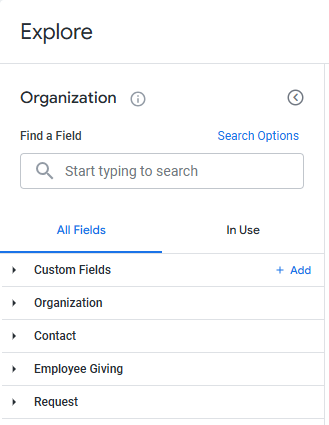
Proceed through the steps outlined below to access the Insights Organization Explore and view its available data fields.
Step 1: Access the Insights tab
Log in to the CyberGrants platform and navigate to the Insights tab.

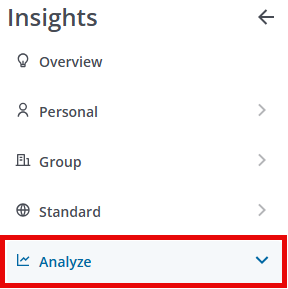
Step 2: Click on Analyze
From the left-hand menu, Insights Analysts can click on Analyze to view the available Explores.
Step 3: Select the Organization Explore
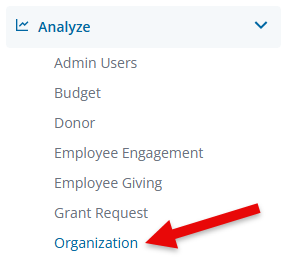
Click on Organization to view the Explore.
Step 4: View the Field Dimensions & Measures
Below are the fields available within the Organization Explore along with their dimensions and measures.
Field Name
|
Dimensions
|
Measures
|
| Organization |
- Cause & NTEE
- Create New Organization
- Dates
- Flags
- geocode_history
- IDs
- Location
- Location: Census
- Location: Geocode
- Name
- NCES
- New Request
- Organization Information
- Organization Type
- Tax
- Vetted User Name
- Year Founded
|
- Counts
- Location: Census
- Location: Geocode
|
| Contact |
- Contact Type
- Email Address
- Fax
- Location
- Name
- Telephone
|
|
| Employee Giving |
- Amounts
- Approval Comments
- Dates
- Description
- Designation
- Disposition
- EG Fiscal Year
- Flags
- IDs
- Is Recurring?
- Recognition
- Reference Code
- Wallet Type
|
- Averages
- Counts
- Medians
- Totals
|
| Request |
- strong class red Total Program Budget strong
- strong class red Program Impact Area strong Funding Principle
- strong class red Program Title strong
- Amounts
- Dates
- Disposition
- Flags
- GIK Request Workflow Status
- Grant Year
- Grantseeker
- IDs
- Invitation
- Number of Payments
- Reference Code
- Request Owner
- Request Submitted By
- Request Type
- Strategy
- Tags
|
|
What else do you need help with?
Not what you're looking for? Navigate to Understanding Standard Insights Explores. To learn more about using an Explore to analyze your program's data, please refer to Navigating Insights Explores Basics or return to Insights Analyze Basics Overview.


