Organization Portal Page Overview
An Organization Portal allows organizations to log in independently of an application to:
- Verify donations by employees
- Verify and Update address information
- Verify and Update banking information
- View confirmation History
- View payment history
- View payment details of specific checks
NOTE: The user experience differs for organizations when FrontDoor is enabled.
Organization Portal Page Configuration
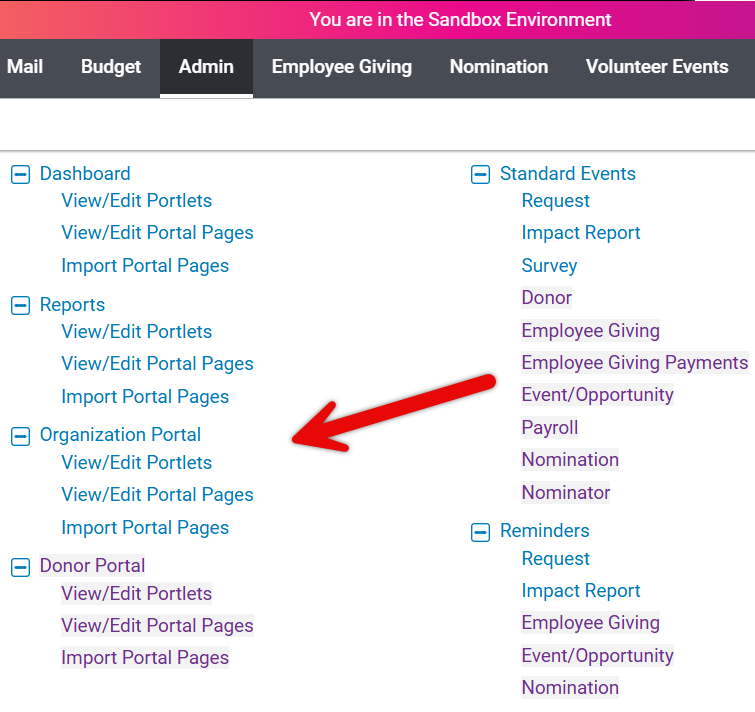
To configure the organization portal pages or portlets, the configuration must be done in the Sandbox environment. Only certain users will have access to the Sandbox environment, and only users with administrative access will be able to configure and change portal pages.
Program administrators with access can edit existing portal pages, create new portal pages, rearrange the order of pages, as well as view and edit portlets.
- Any changes to portlets and portal pages will need to be published (from Sandbox) to reflect those changes in production.
Downloadable Payment Details for Organizations
Our download capability gives organizations access to those same data points by making extracts available via links on the disbursement portlets.
- Since the data is in comma-separated value (CSV) format, it can be easily opened from their desktops using Excel or imported into their larger tracking systems.
- The extracts include additional details not available in the transmittal letter and so we have provided a data dictionary that clearly explains each element.
- Downloadable payment details are automatically available on all organization payment detail portlets.
What else do you need help with?
Not what you're looking for? Navigate to Understanding Content Configuration.


