Budget Overview
The Budget portal provides a robust and user-friendly interface for managing and analyzing program budgets. With its comprehensive features and intuitive design, the budget portal empowers administrators to effectively oversee and optimize their program's financial resources.
- It is essential to note that budgets are configured and managed within the Production environment to ensure that all budget-related activities and configurations are seamlessly executed in the live, operational system.
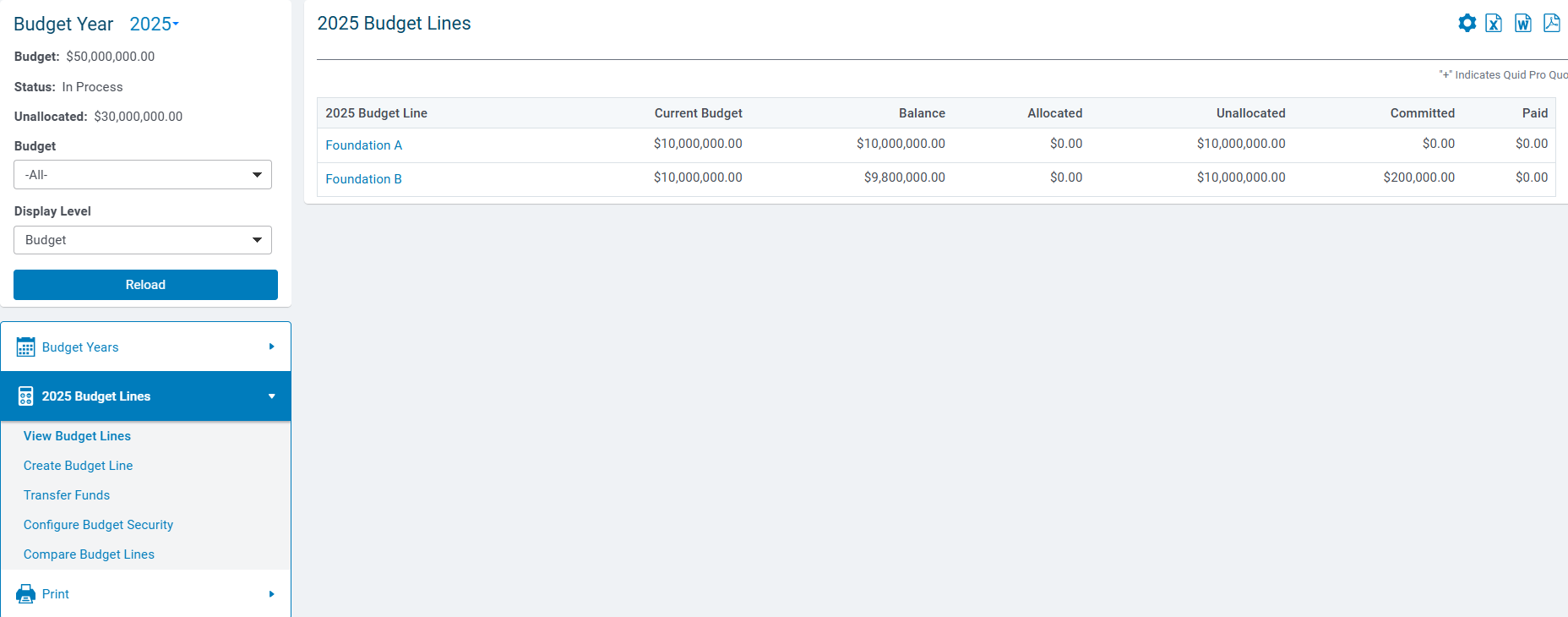
- The main screen of the Budget tab provides a comprehensive view of the budget, budget lines, and individual budget amounts for the most recent fiscal year.
- The Budget tab also offers several options for customizing the displayed budget information, including selecting a specific budget from a dropdown list and choosing the desired display level.
- The Navigation Frame also displays key budget information at the top of the screen, including the Budget Year, Budget, Status, and Unallocated totals. This allows administrators to quickly see the year being managed, the overall budget amount, its current status (In Process, Open, or Closed), and any funds not yet allocated.]
- After selecting a Year, Budget, or Display Level, administrators must click the Reload button to refresh the screen and display the updated information.]
Review the following articles to learn about the available Budget management options and how to leverage this portal to efficiently navigate and analyze the budget data for your programs.
What do you need help with?
Additional Resources
Not what you're looking for? Navigate to CyberGrants Account Administration Overview
Looking for training?
Explore this feature at your own pace - access training video content or watch a recorded webinar by clicking the link below.


