The Budget tab provides administrators with a comprehensive view of their program's budget, enabling them to effectively manage and monitor their financial resources.
Follow the steps below to learn about navigating through key areas using the functionalities available within the Budget tab.
Step 1: Access the Budget Tab
Budgets are configured in Production. Select "Access Production” from the Sandbox environment or log into the Production environment.

Step 2: View the Main Screen
The main screen of the Budget tab provides a comprehensive view of the budget, budget lines, and individual budget amounts for each budget line for the most recent year. This screen is divided into two key areas:
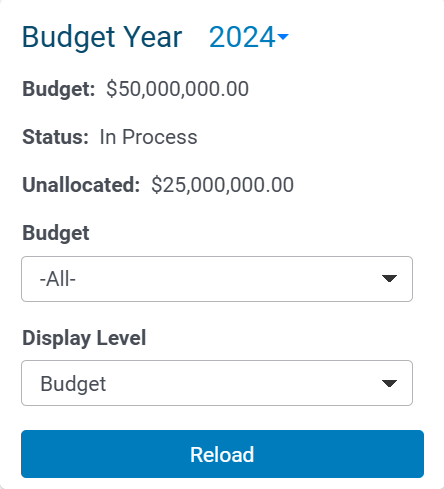
- Navigation Frame Summary Panel - The left-hand side of the screen is the Navigation Frame, which displays a summary of the current budget year. Users can select or specify the information to be shown in the Information Frame, including budget year, budget lines, and other options for budget information specification and filtering.
- Information Frame - The main area of the screen displays detailed budget information, such as the total budget, budget line items, and budget allocation status.
Step 3: Access the Navigation Menu
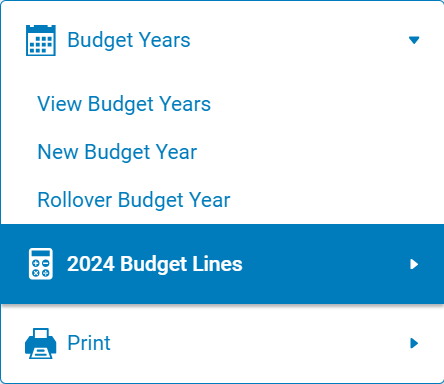
The Budget Navigation panel located below the Budget Header Information is the Navigation Menu and provides users with the following options:
- Budget Years - Users can view and select the desired budget year to display.
- Budget Lines - Users can navigate and access individual budget line items.
- Print - Users can generate a printed report of the current budget information.
Step 4: Explore the Navigation Frame
The total budget for the year, the budget year status, and how much of the budget is unallocated are shown at the top of the Navigation Frame:
- Budget Year - The Budget Year is located in the top left corner and represents the year that the budget and budget lines equate to.
- Budget - The Budget, located below the Budget Year, represents the total amount available for giving across all of the budget lines for the displayed Budget Year.
- Status - The Status of the budget year is located below the Budget Amount. A budget can have three different statuses: In Process, Open, or Closed.
- Unallocated - The Unallocated amount located below the Budget Year Status represents the amount of money still available to be divided among the budget lines for the displayed budget year. Note: Unallocated funds cannot be used for payments until they are allocated to budget lines.
What else do you need help with?
Not what you're looking for? Navigate to Budget Overview


