The Advanced Donor Analysis Dashboard offers administrators and coordinators a deeper understanding of their program's employee participation trends related to recency, frequency, and hour-based or monetary amount.
With a range of insightful metrics, including donor retention type, gift size and count tiers, median engagement data, and demographic information, this dashboard provides administrators with actionable information to identify how much, how often, and how many times employees engage, facilitating smarter and more predictive programmatic decision-making to increase participation.
Target Audience: Program Administrators & Program Coordinators
Proceed as follows to further explore the Advanced Donor Analysis standard dashboard and its features.

Step 1: Access the Dashboard
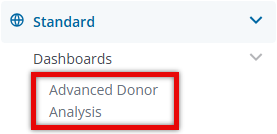
Navigate to the Insights platform and choose Advanced Donor Analysis from the list of Standard Dashboards in the left-side navigation panel.
Step 2: Explore the Dashboard Reports
The following is a list of reports included in the Advanced Donor Analysis standard dashboard.
Report Name
|
Description
|
| Total Employees | The total count of unique employees based on the dashboard filters that are applied. |
| Total Gift Amount | The sum of all employee gifts over time. |
| Total Hours | The sum of all hours volunteered over time. |
| Median Days Since Last Engagement | The median number of complete days since employees last donated or volunteered. |
| Median Gift Amount per Donor | The median gift amount across all employees who have donated. |
| Median Organization Count per Donor | The median count of organizations with which an employee has donated or volunteered. |
| Total Gift Size Tier | The gift size tier an employee belongs to, based on the sum of all gift donations. |
| Last Engagement - Day of Week | The days of the week that employees last donated or volunteered. |
| Retention Type | The retention type an employee belongs to, based on their engagement (giving or volunteering) over the span of time they have been an active employee. |
| Donation Types | Identifies the type of donation an employee has made. Expected values would be: Gifts Only, Hours Only, Gifts & Hours, or None. |
| Gift Count Tier | The gift count tier an employee belongs, based on the total number of times they have donated. |
| US vs Non-US Employees | The percentage of employees that are located inside and outside of the United States, based on the employee's Country on the HR file. |
| Employee Country | The employee's assigned Country on the HR file. If employees do not have a Country on the HR file, they will be returned as null. |
| Employee Age Generation | The age generation an employee belongs to, based on their birthdate that is passed through the HR file. |
Step 3: View Fields used in the Dashboard
Below are some key fields used to display data in the report tiles available on this dashboard.
Step 4: Use the Dashboard Filters
Insights users can utilize the following filters to adjust their view of the data displayed across all tiles within this dashboard.


