In 2024, we officially entered an Innovation Partnership with CECP (Chief Executives for Corporate Purpose) with the shared goal of streamlining the data-gathering process for the annual CECP Giving in Numbers survey, improving industry benchmarking and CSR insights.
For over 20 years, CECP has leveraged data from its annual survey—completed by hundreds of companies—to publish the Giving in Numbers report. This report helps corporations benchmark their corporate community investments, including cash and non-cash contributions, employee volunteerism and giving, and impact measurement.
Dashboard Details
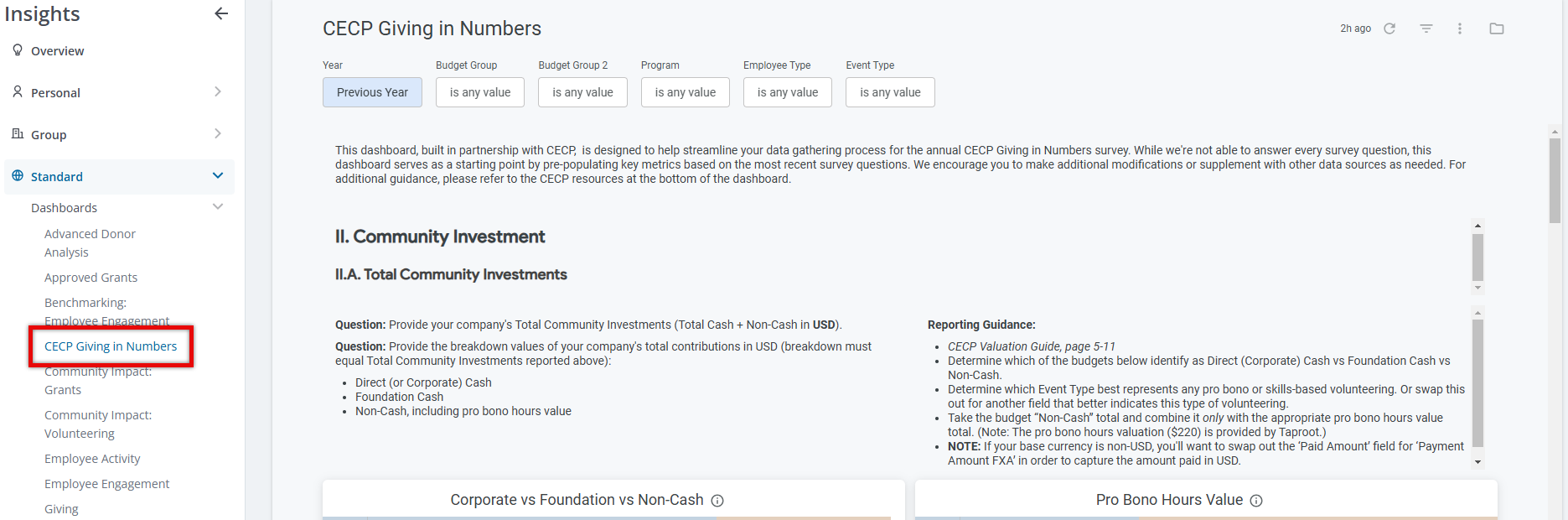
The CECP Giving in Numbers dashboard provides administrators with a centralized dashboard to access key survey-related data, covering areas such as Total Community Investments (TCI), employee engagement, and international investments.
The dashboard is available to all Insights users within the Standard > Dashboards folder and aims to simplify the process of gathering, organizing, and submitting required information, ultimately enhancing efficiency and accuracy for administrators.
Target Audience: Program Administrators & Program Coordinators responsible for gathering and reporting corporate social responsibility (CSR) metrics.
Key Features:
- Clear mapping of specific CECP survey questions to relevant data sets.
- Textual guidance and links to CECP resources for additional context.
- Advanced filtering options for tailored data adjustments.
- Customizability, allowing users to copy and modify the dashboard to fit their organizational needs.
Key Benefits:
- Time Savings & Efficiency - The structured, CECP-aligned data format significantly reduces the time required to gather and report CSR metrics—a process that often takes days or even weeks.
- Improved Accuracy & Benchmarking - Admins can focus on analyzing their social impact rather than compiling data while gaining clearer CECP insights into how they compare with industry peers.
- Enhanced Reporting Experience - A streamlined experience ensures that organizations can participate in the Giving in Numbers survey with minimal effort and greater confidence.
Frequently Asked Questions
CECP Survey Toolkit Resources
1. Where can I find more information on the CECP Giving in Numbers survey?
CECP provides a variety of helpful resources related to their survey on their Survey Toolkit page. View the Survey Toolkit
Accessing CECP Giving in Numbers Dashboard
2. How do I access the CECP reporting dashboard in Insights?
Enter CyberGrants and navigate to the Insights tab. The CECP Giving in Numbers dashboard is located within the Standard > Dashboards folder.
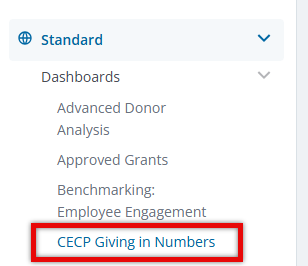
CECP Dashboard Insights and Filters
3. Which CECP survey questions does the dashboard help answer?
While the dashboard does not address every survey question, the first iteration covers 16 questions across the following sections:
- Total Community Investment
- International
- Employee Engagement
- Administration
4. Can I filter the data to match my company’s reporting needs?
Yes! The dashboard includes several filter options to refine the data:
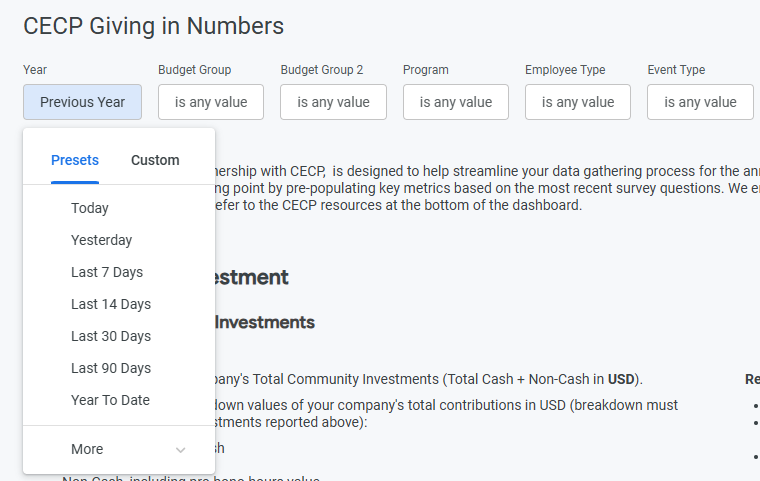
- Date – Defaults to the previous payment year but can be adjusted as needed.
- Budget Group – Select from available tier 1 budget lines.
- Budget Group 2 – Select from available tier 2 budget lines.
- Program – Filter by proposal type.
- Employee Type – Filter by available employee types.
- Event Type – Filter by available event types.
Customizing the CECP Dashboard
5. How can I swap out a field on the dashboard to better support our data?
- In the left navigation panel, select the paper icon next to the standard dashboard name and create a copy.
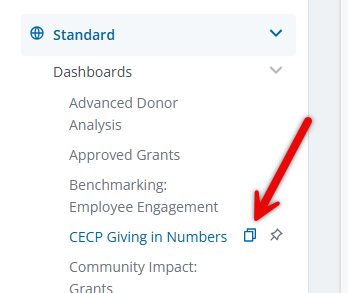
- Choose whether to save your copy to your Group or Personal dashboard folder.
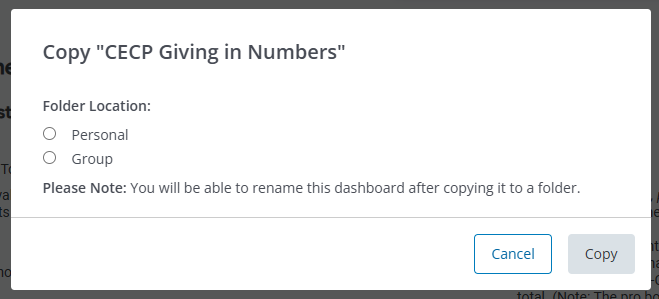
- In your copied dashboard, select Edit Dashboard and modify the relevant tile.
- Locate the field that better supports your data needs and add it to the data table.
- Remove any unnecessary fields and save your changes.
6. Can I ingest external data sources into the dashboard?
At this time, the dashboard only supports data collected within CyberGrants. External data sources must be combined outside of Insights.
7. Can I submit my CECP survey responses directly from Insights?
No. Since this is not a direct integration, the dashboard does not support sending or receiving data to/from CECP.
CECP Program Area NTEE Mapping
8. How do NTEE Categories map to CECP’s Program Areas?
CECP Program Area:
|
NTEE Categories
|
| Civic & Public Affairs | Public, Societal Benefit, International, Foreign Affairs |
| Community & Economic Development | Public, Societal Benefit, International, Foreign Affairs |
| Culture & Arts | Arts, Culture, and Humanities |
| Disaster Relief | Human Services, International, Foreign Affairs |
| Higher Education | Educational Institutions |
| K-12 Education | Educational Institutions |
| Environment | Environmental and Animals |
| Health & Social Services | Health / Human Services |
| Other | No NTEE Code - Unknown, Unclassified |
9. Are any NTEE Categories excluded from the dashboard’s dataset?
Yes, based on CECP’s guidance, data tied to nonprofit organizations in the following NTEE Categories have been excluded:


